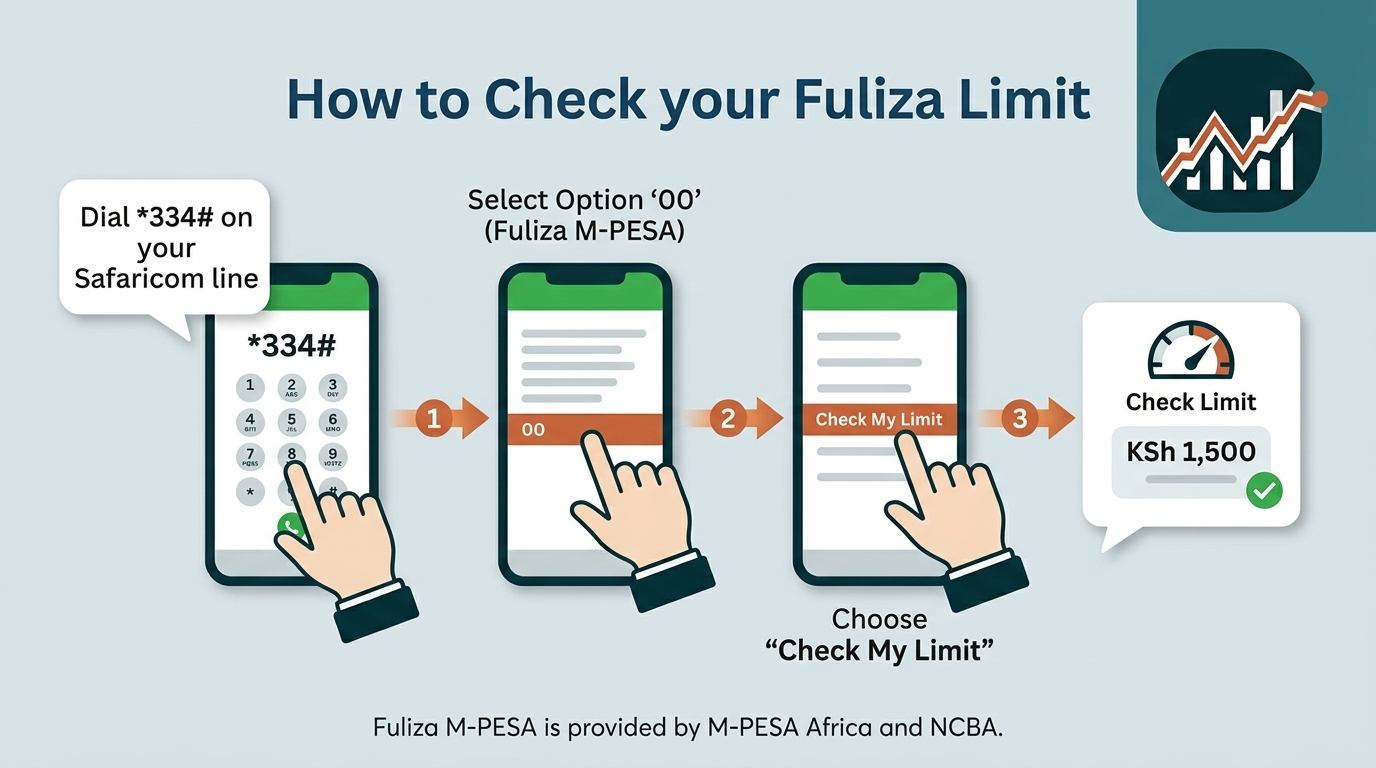
To check your Fuliza limit, dial *334# on your Safaricom line, select option 00 (Fuliza M-PESA), then choose Check My Limit. Your total limit, remaining available amount and outstanding balance appear on screen within seconds and arrive separately as a confirmation SMS. The check is free, works on any handset including a basic feature phone, and requires no data bundle.
One point of confusion is worth settling before you dial. A large share of published guides still direct readers to *234# for Fuliza. That was the historic M-PESA menu, and it continues to route many users to the overdraft options. However, Safaricom’s own customer support channel now consistently gives *334# as the path. Responding to a customer query in February 2026, Safaricom advised dialling *334#, selecting 00 for Fuliza, then Check My Limit. It repeated the same routing in June 2026 when advising a customer on refreshing a zero limit. Treat *334# as the current path and *234# as a legacy fallback.
How Do You Check Your Fuliza Limit Using the M-PESA Menu?
Dial *334#, select Fuliza M-PESA (option 00), then select Check My Limit — the full sequence takes under 30 seconds. The USSD route is the most reliable of the available methods because it does not depend on app version, operating system or internet connectivity.
- Dial
*334#from the Safaricom line registered to your M-PESA account. - Select Fuliza M-PESA. On the current menu this sits at option 00, at the foot of the main list.
- Select Check My Limit.
- Read the on-screen response, which shows your assigned limit and any outstanding balance.
- Wait for the confirmation SMS, which repeats the same figures in a message you can refer back to later.
Two practical notes. The menu numbering can shift when Safaricom updates the USSD tree, so read the option labels rather than memorising the digits. And if *334# returns a busy or unavailable error during peak hours, waiting a few minutes and redialling usually resolves it, since the platform throttles briefly under load.
How Can You Check Your Fuliza Limit on the M-PESA App?
Open My OneApp, go to the Fuliza section, and your limit and outstanding balance display on the Fuliza dashboard. If you are looking for the standalone M-PESA app and cannot find it, that is expected — the app was consolidated in April 2026.
Safaricom unveiled My OneApp on 2 April 2026 at its Decode 4.0 engineering summit in Nairobi, merging the M-PESA app and the MySafaricom app into a single platform. According to TechCabal, migration notices began reaching M-PESA app users from 3 April 2026, bringing more than 10 million users onto one interface. Your M-PESA wallet, PIN and transaction history carried across the migration; the name and interface are what changed.
- Open My OneApp and sign in with your Safaricom number, PIN or biometric login.
- Locate Fuliza. Because the app applies behavioural personalisation, Fuliza often surfaces directly on the home screen if you use it regularly; otherwise find it under the financial services or lending grouping.
- View your limit, amount used and outstanding balance on the Fuliza dashboard.
The app advantage is history rather than the headline number. USSD gives you a snapshot; the app shows your usage over time, which matters if you are trying to understand why your limit moved.
What Information Do You See When You Check Your Fuliza Limit?
A Fuliza limit check returns four distinct figures: your total limit, your available limit, the amount you have used, and your outstanding balance. These are commonly treated as interchangeable, and they are not. Confusing the used amount with the outstanding balance is the single most frequent reason people are surprised by an auto-deduction.
What Is Your Total Fuliza Limit?
Your total Fuliza limit is the maximum overdraft Safaricom has assigned to your line, ranging from KSh 0 for ineligible or new customers up to a documented ceiling of KSh 70,000. It is a personalised figure, not a product-wide one.
The limit is generated automatically by a credit-scoring process rather than requested by the customer. Safaricom’s published Fuliza terms state that the score considers a range of factors including a customer’s use of Safaricom services and their repayment history. Limits move in both directions: they are refreshed upwards or downwards depending on usage and timely repayment.
What Is Your Available Fuliza Limit?
Your available Fuliza limit is the amount you can still draw right now, calculated as your total limit minus everything you currently owe. This is the operative number when you are about to make a transaction.
If your total limit is KSh 5,000 and you owe KSh 1,200, your available limit is KSh 3,800. It restores automatically as repayments clear, without any action on your part.
What Is Your Used Fuliza Amount?
Your used Fuliza amount is the principal you have actually drawn — the shortfall Fuliza covered on your transactions — excluding fees. If Fuliza covered a KSh 400 gap on one payment and a KSh 600 gap on another, your used amount is KSh 1,000.
This figure is useful for reconciliation, but it is not what will be deducted from your next deposit. That is the outstanding balance.
What Is Your Outstanding Fuliza Balance?
Your outstanding Fuliza balance is the total repayable amount: the principal drawn, plus the one-off 1% access fee, plus every daily maintenance fee accrued to date and the excise duty on those fees. It is always equal to or larger than your used amount, and it grows each day the balance sits unpaid.
The mechanics matter here. The 1% access fee is charged once, when you draw. The daily maintenance fee is then applied at midnight on any outstanding balance, and a 20% excise duty is charged on that maintenance fee. Because the fee is a flat band amount rather than a percentage, a small overdraft carried for a long period becomes expensive in proportional terms.
How Do You Check How Much Fuliza You Have Left?
Your remaining Fuliza is your total limit minus your outstanding balance, and the Check My Limit response on *334# shows both figures in the same message. You do not need to calculate it separately in most cases, because the response states the available amount directly.
Where the calculation becomes necessary is when you have drawn recently and want to know your headroom before the next transaction. Subtract the outstanding balance — not the used amount — from the total limit. Using the outstanding figure accounts for accrued fees and gives you the number Safaricom’s system will actually apply.
Bear in mind that any money entering your M-PESA wallet is applied to the Fuliza balance first. A deposit therefore increases your available Fuliza limit before it increases your usable wallet balance.
Can You Check Your Fuliza Limit Without Using the M-PESA App?
Yes — USSD requires no app, no smartphone and no internet connection, and remains the primary method Safaricom directs customers to. Confirming this in February 2026, Safaricom advised a customer using a basic handset that the limit can still be checked on a kabambe phone through the USSD menu.
You have several app-free options:
- USSD menu —
*334#> Fuliza M-PESA > Check My Limit. Works on every GSM handset. - Legacy USSD —
*234#> Fuliza M-PESA. Still routes on many lines; use it if*334#does not display the Fuliza option. - Confirmation SMS — every limit check and every Fuliza transaction generates a message. Your most recent one contains your limit and balance at that time.
- Limit-change notifications — Safaricom sends an SMS when your limit is revised, stating the new figure.
- Customer care — call 234 from your Safaricom line, or visit a Safaricom shop with your original ID.
This accessibility is not incidental. USSD carries a substantial share of Kenya’s mobile money activity precisely because it works on the low-cost handsets that a large portion of M-PESA’s base still uses.
Does It Cost Money to Check Your Fuliza Limit?
No. Checking your Fuliza limit is free on both USSD and the app, and you can check as often as you like without charge. Safaricom’s service USSD codes are free to dial, and no airtime is deducted for the session.
Two clarifications are worth stating plainly, because the distinction between checking and borrowing is where costs get misattributed:
- Checking is free. Borrowing is not. Charges begin only when Fuliza covers a transaction shortfall — a one-off 1% access fee, then daily maintenance fees on the outstanding balance.
- The app uses data; USSD does not. Opening My OneApp consumes a small amount of your bundle. The USSD session does not require data at all.
Refreshing your limit is also free, and carries no penalty if the review returns the same figure.
Why Can’t You See Your Fuliza Limit?
The most common reason the Fuliza option does not appear is that the line has never been opted in to the service, since Fuliza is not enabled by default on M-PESA accounts. The menu entry is absent rather than showing a zero figure.
The likely causes, in rough order of frequency:
- You have not opted in. Activate through the same menu path —
*334#> Fuliza M-PESA > Opt In — and accept the terms. - Your M-PESA account is registered on a foreign passport. Accounts registered with a foreign passport cannot successfully opt in to Fuliza. Registration with a national ID, Kenyan passport or military ID is required.
- You are dialling from a different line. The check must come from the Safaricom number registered to the M-PESA account.
- The session timed out. USSD sessions expire after a short idle period. Redial and move through the menu without pausing.
- You are on the wrong menu branch. On some line configurations Fuliza sits under Loans and Savings rather than at option 00.
Why Is Your Fuliza Limit Showing as Zero?
A zero limit most often means you have been active on the Safaricom network for less than six months, which triggers an automatic zero allocation regardless of how well you use M-PESA. Safaricom states in its guidelines that customers on the network for under six months are assigned a zero limit.
Opting in and qualifying are separate steps. Activation is straightforward; the credit assessment that follows is not guaranteed to return a usable figure. The main drivers of a zero or reduced limit:
- Under six months on the network. An automatic zero until sufficient usage history accumulates.
- Delayed or defaulted repayment. Safaricom has stated directly that a Fuliza limit may be reduced where a customer has delayed or defaulted on repayment.
- Outstanding balances on related products. Safaricom has advised customers with zero limits to ensure outstanding loans are repaid on time, including Okoa Jahazi.
- Scoring factors beyond transaction volume. High M-PESA turnover alone does not guarantee a limit. Responding to a customer who queried a persistent zero limit despite consistent usage, Safaricom described the scoring as an automated process weighing multiple metrics, and has not published the complete formula.
If your limit is zero, you can trigger a review. Dial *334#, select option 00, then choose Refresh My Limit. Safaricom gave this instruction publicly in June 2026 to a customer reporting a zero limit. Set expectations accordingly: refreshing prompts a reassessment, and does not guarantee that a limit will be granted.
One caution. Safaricom has publicly warned about fraudulent social media pages offering to raise Fuliza limits artificially, naming several fake accounts. No third party can adjust your limit. Any page or individual charging a fee to do so is running a scam.
What Should You Do If You Cannot Access the Fuliza Menu?
Work through the fixes in order of effort: retry the session, try the alternative USSD code, then escalate to customer care on 234. Most access failures are session or menu-path issues rather than account problems.
- Redial without pausing. Idle sessions expire. Move through the menu promptly.
- Try the legacy code. If
*334#does not surface Fuliza, dial*234#and select Fuliza M-PESA. - Check network registration. Confirm the line has signal and is registered on the network. Restart the handset if the code returns nothing at all.
- Retry after a few minutes. The platform throttles briefly during peak load, returning a service-unavailable error that clears on its own.
- Use My OneApp instead. If USSD is failing on your line specifically, the app reads from the same account data.
- Confirm your opt-in status. If Fuliza was never activated, or was deactivated, the menu will not display limit options. Our guide on how to opt out of Fuliza covers the opt-in and opt-out mechanics.
- Call 234 or visit a Safaricom shop. For account-level issues — suspected registration problems, or a limit that does not match your notifications — escalate with your original ID.
How Can You Increase Your Fuliza Limit?
Fuliza limits rise through consistent Safaricom and M-PESA usage combined with prompt repayment, and are refreshed automatically rather than granted on request. Safaricom’s guidance is that customers must continue using Safaricom and M-PESA services and repay the Fuliza facility on time by topping up their M-PESA account.
The same logic applies in reverse — the limit is refreshed upwards or downwards depending on usage and repayment behaviour, so a period of late repayment can reduce a limit that was previously healthy. The mechanism also leaves little room for customer input: Safaricom has clarified that limits are automatically generated based on financial behaviour and are not manually requested, which means customers cannot request a reduction either.
For the full method, including the repayment patterns that carry the most weight and the timelines involved, read our dedicated guide: How to Unlock Fuliza Limit: 6 Proven Ways. If your limit is low rather than zero, the mechanics of rebuilding it overlap heavily with general creditworthiness — our explainer on what a credit score is and how it works in Kenya covers the underlying scoring principles.
How Do You Check Your Fuliza Balance Before Using Fuliza?
Check your limit before you transact, not after, because Fuliza engages automatically at the point your wallet balance falls short — there is no separate borrowing step to reconsider. Once you accept the prompt at the end of a transaction, the access fee applies.
A useful habit before any significant payment: dial *334#, confirm your wallet balance and your available Fuliza headroom, and only then transact. This tells you whether the payment will draw on Fuliza at all, and how much it will draw.
Knowing the cost in advance is the other half of the decision. Fuliza charges a one-off access fee of 1% of the amount drawn, plus a flat daily maintenance fee determined by your outstanding balance band, with 20% excise duty applied to that daily fee. Balances of KSh 1,000 and below carry no daily maintenance fee for the first three days.
| Outstanding balance (KSh) | Daily fee before excise (KSh) | Daily fee incl. 20% excise (KSh) |
|---|---|---|
| 0 – 100 | 0.00 | 0.00 |
| 101 – 500 | 2.50 | 3.00 |
| 501 – 1,000 | 5.00 | 6.00 |
| 1,001 – 1,500 | 18.00 | 21.60 |
| 1,501 – 2,500 | 20.00 | 24.00 |
| 2,501 – 70,000 | 25.00 | 30.00 |
This table resolves a discrepancy you will meet across other sources. Some publish the top daily fee as KSh 25, others as KSh 30; some give the KSh 101–500 band as KSh 2.50 and others as KSh 3. Both sets are correct — they are the same figures before and after the 20% excise duty. Safaricom publishes the fee before excise, and excise is added on top. Confirm your own band on *334#, since terms are assigned per customer.
The practical implication is that duration, not size, drives the cost. A balance anywhere in the KSh 2,501–70,000 band accrues roughly KSh 30 daily including excise, which is around KSh 900 over a 30-day period whether the balance is KSh 3,000 or KSh 30,000. Fuliza was designed as a short-term facility — NCBA’s group managing director described the original intent as an overdraft for four to seven days. For anything longer, a fixed-fee product is generally the cheaper structure.
Scale gives some context for how heavily the facility is used. According to figures reported from Safaricom’s FY2026 results, Fuliza disbursements rose approximately 49% year on year to around KSh 1.47 trillion, with repayments at a comparable KSh 1.49 trillion. Even so, penetration sits at roughly 17–18% of Safaricom’s active customer base, so the service is used intensively by a minority rather than relied on universally.
Frequently Asked Questions About Checking Your Fuliza Limit
What Is the USSD Code for Checking a Fuliza Limit?
The current code is *334#, followed by option 00 for Fuliza M-PESA, then Check My Limit. The older *234# menu still reaches Fuliza on many lines and works as a fallback.
What Is the Maximum Fuliza Limit?
The documented maximum is KSh 70,000. Reaching it requires a sustained record of high M-PESA transaction volumes and consistent on-time repayment. Most customers hold limits well below this ceiling.
How Often Is Your Fuliza Limit Reviewed?
Limits are reviewed periodically and adjusted in either direction based on usage and repayment behaviour, and Safaricom has not published a fixed review interval. You can trigger an off-cycle review at any time using Refresh My Limit on *334#. Customers are notified by SMS when a limit changes.
Can You Check a Fuliza Limit on a Basic Phone?
Yes. USSD works on any GSM handset, and Safaricom has confirmed directly that the limit can be checked from a kabambe phone via the USSD menu. No internet, app or smartphone is required.
Why Did Your Fuliza Limit Drop?
A reduced limit usually follows delayed or missed repayment. Safaricom has stated that a Fuliza limit may be reduced where a customer has either delayed or defaulted on repayment. Reduced M-PESA activity can also contribute, since the scoring weighs ongoing usage alongside repayment history.
Does Checking Your Fuliza Limit Affect Your Credit Score?
No. Checking your limit is a read-only enquiry on your own account and does not constitute a credit application. What affects your standing is drawing on the facility and how promptly you repay it — Fuliza is provided with NCBA and KCB as the lenders, and repayment conduct feeds the scoring that determines future limits.
Can Someone Else Check Your Fuliza Limit for You?
No. The check must be performed from the registered Safaricom line, and the account holder must present original identification for any assisted enquiry at a Safaricom shop. Never share your M-PESA PIN. Safaricom does not request PINs by phone, SMS or USSD prompt, and any such request is fraudulent.
Where Do the Figures in This Guide Come From?
Menu paths and eligibility rules are drawn from Safaricom’s own customer communications and published Fuliza terms; tariff bands are drawn from Safaricom’s published fee structure as reported by Kenyan business press in mid-2026. Because interface paths and tariffs both change, verify your specific limit and fee band on *334# before relying on any figure for a financial decision.