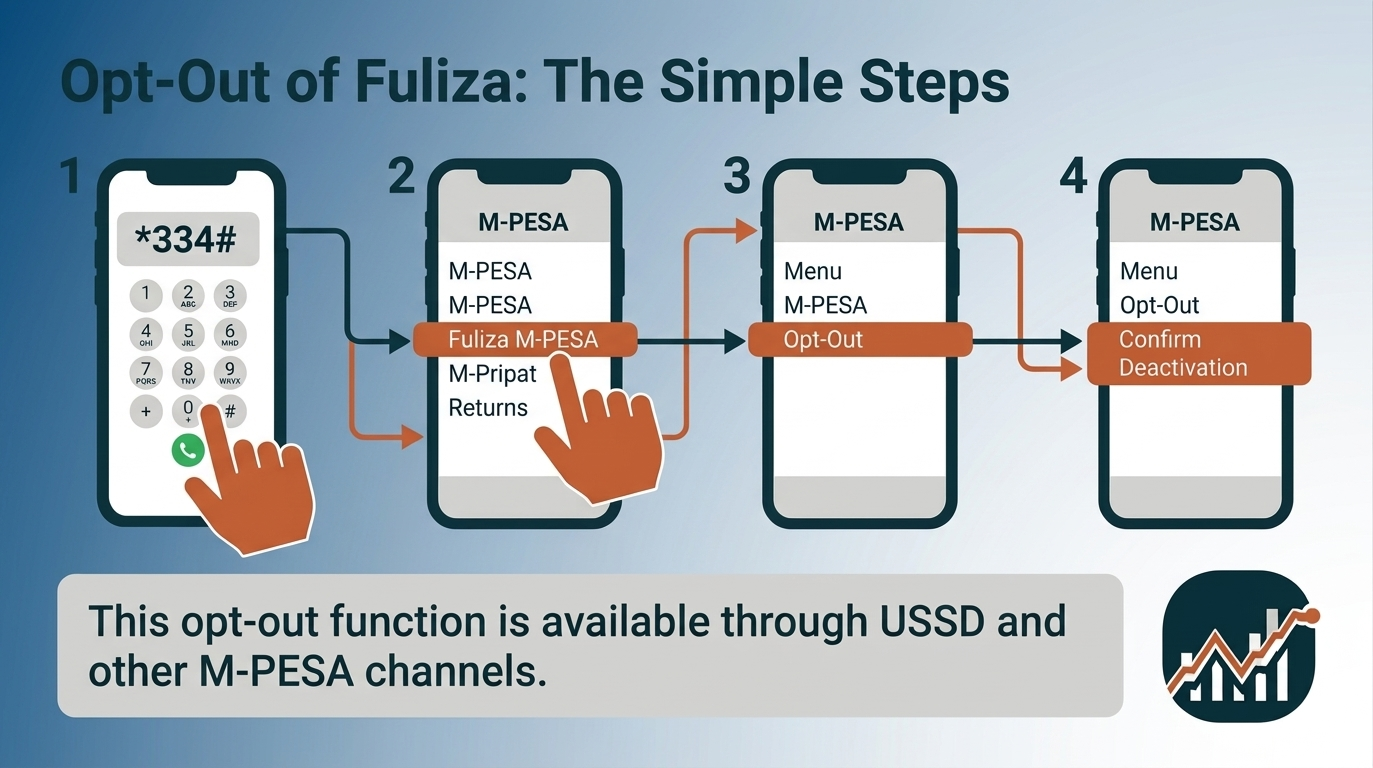
To opt out of Fuliza, dial *334# from your Safaricom line, select Fuliza M-PESA, and choose the opt-out option. Follow the prompts on your screen to confirm that you want to deactivate Fuliza. Safaricom identifies an opt-out function as a menu option available through USSD and its M-PESA/Safaricom channels.
Fuliza is an overdraft service from Safaricom that completes an M-PESA transaction when your balance is insufficient. Safaricom describes it as a continuous overdraft rather than a loan product: it activates automatically on a shortfall, and repayment is taken automatically from any funds later received or deposited into your M-PESA account, along with a daily maintenance fee on the outstanding amount.
Opting out switches off your access to that overdraft. It is a separate action from repaying what you have already borrowed, and the two are frequently confused.
This guide covers the opt-out process, what changes afterwards, what to do when the opt-out fails, how to reactivate, and how opting out differs from repayment.
Menu paths and service terms change. Confirm the current process against Safaricom’s own Fuliza information or customer care before relying on any specific step below.
How do you opt out of Fuliza?
You opt out of Fuliza by dialing *334# on the Safaricom line registered for M-PESA, selecting Fuliza M-PESA, choosing the opt-out option, and confirming when prompted. Safaricom’s published Fuliza information lists the opt-out alongside your limit, balance and mini statement in that same menu.
Using USSD:
- Dial *334# on the registered Safaricom line.
- Select Fuliza M-PESA.
- From the options shown — limit, balance, mini statement, opt out — select the opt-out option.
- Confirm when prompted.
- Wait for the confirmation SMS from Safaricom.
Safaricom customer care has also directed customers to *234# for the Fuliza menu. If one code does not display the option on your line, try the other.
Using the M-PESA app:
- Open the M-PESA app and locate Fuliza in your services or account section.
- Open the Fuliza service page.
- Select the opt-out option — on some app versions it sits behind the menu icon in the corner.
- Confirm your choice and wait for the confirmation message.
What you need before starting:
- The Safaricom line registered to the M-PESA account, with network access
- Your M-PESA PIN
- Your current Fuliza balance, which the same menu displays
Treat the request as incomplete until the confirmation message arrives. A USSD session that times out mid-way changes nothing on your account.
Can you opt out of Fuliza if you still have an outstanding balance?
Yes. However, opting out of Fuliza does not cancel or erase an outstanding Fuliza balance. An existing Fuliza balance remains a repayment obligation even after you stop or deactivate access to future Fuliza borrowing.
Opting out affects your future access to Fuliza, not money you have already borrowed. If you have an outstanding Fuliza balance, you still need to repay the amount according to the applicable repayment terms. Once you opt out, you should therefore think of two separate actions: stopping future Fuliza use and clearing your existing Fuliza balance.
Does opting out cancel Fuliza debt? No. Deactivating or opting out of Fuliza should not be treated as a way to avoid repayment. Your outstanding balance is separate from your ability to access additional Fuliza funds.
Repayment continues to work the way it always has. Any funds received or deposited into your M-PESA account are applied automatically to the outstanding Fuliza amount, and the daily maintenance fee continues to accrue on that amount until it is cleared. You can check the balance from the Fuliza menu at any time.
If your main reason for opting out is to stop borrowing while you repay what you already owe, you can opt out and continue focusing on clearing the outstanding balance. If you’re considering opting out because of the cost of borrowing, it may also help to compare Fuliza’s fees, borrowing limit and repayment terms with other digital loan options before deciding.
What happens after you opt out of Fuliza?
After you opt out of Fuliza, the overdraft stops covering your shortfalls. Transactions that exceed your available M-PESA balance are declined instead of being completed on credit. Everything else about your M-PESA account continues to work as before.
| What changes | What stays the same |
|---|---|
| Fuliza no longer covers shortfalls on your transactions | Your M-PESA account works normally |
| You stop taking on new Fuliza borrowing | Your line, number and M-PESA PIN are unaffected |
| Transactions above your available balance are declined | Other M-PESA products you use are unaffected |
| You no longer have overdraft access | Any outstanding Fuliza balance remains repayable |
The practical effect is that your spending is limited to the money actually in your wallet. A payment you could previously push through on the overdraft will now fail for insufficient funds. For most people who opt out, that is the intended outcome rather than a side effect.
Daily maintenance fees stop accruing only once the outstanding balance itself is cleared, since the fee is charged against the balance rather than against having the service switched on.
Does opting out of Fuliza cancel your existing debt?
No. Opting out of Fuliza does not cancel, reduce or write off an existing Fuliza balance. Opting out changes your access to future borrowing; it has no effect on money already advanced to you.
A Fuliza balance is an amount you owe irrespective of whether the service is active on your line. Deactivating access does not stop the daily maintenance fee accruing on that balance, and it does not release you from the repayment terms you accepted when you opted in.
Recovery also continues after opting out. Money received or deposited into your M-PESA account is still applied automatically to the outstanding Fuliza amount until it reaches zero.
If your goal is to stop the automatic deductions, opting out alone will not achieve it. The deductions stop when the balance is cleared, not when access is switched off.
Can you still use M-PESA after opting out of Fuliza?
Yes. You can use M-PESA normally after opting out of Fuliza. Fuliza is a service layered on top of M-PESA, not a requirement for holding or using an M-PESA account, and opting out does not deregister your line or restrict any standard M-PESA function.
After opting out you can still:
- Send and receive money
- Deposit and withdraw at an M-PESA agent
- Pay through Lipa Na M-PESA — Buy Goods and Paybill
- Buy airtime and data bundles
- Request statements, change your PIN and manage your account
The single difference is the source of funds. Every transaction is now settled from your available balance only. Fuliza governs whether a shortfall gets covered; it does not govern M-PESA itself.
If a transaction fails after you opt out, check your balance before assuming a fault. An insufficient-funds decline is the expected behavior of an account without overdraft access.
Why would you want to opt out of Fuliza?
People opt out of Fuliza to stop unplanned borrowing, to stop automatic deductions from incoming funds, and to avoid daily maintenance fees. The common thread is a decision to limit spending to available balance rather than to an overdraft.
Specific reasons include:
- Ending the automatic deduction cycle. Because repayment is taken from incoming funds, money you receive can be absorbed before you can use it. Opting out stops new borrowing that would feed that cycle.
- Preventing unintended borrowing. Fuliza activates automatically on a shortfall rather than on request, so a transaction can become a borrowing event without a deliberate decision.
- Avoiding daily maintenance fees, which accrue against an outstanding balance for as long as it remains unpaid.
- Enforcing a spending limit, since declined transactions provide a hard ceiling that willpower alone does not.
- Breaking a repeat-borrowing pattern, where each shortfall is covered by the overdraft and the next deposit repays it, leaving the same shortfall to recur.
None of this makes Fuliza unsuitable in itself. It is a facility with a defined cost. Opting out is a judgment that the cost has stopped being worth it in your circumstances.
Can you temporarily stop using Fuliza without opting out?
There is no temporary pause option in the Fuliza menu. You can, however, leave the service active and avoid triggering it by keeping your M-PESA balance above the value of each transaction, since Fuliza only activates when funds are insufficient.
Access can also lapse without any action on your part. Safaricom’s terms state that you lose access to your Fuliza limit if a balance remains unpaid after 30 days, and that access is restored on full repayment. That is a consequence of non-payment rather than a method for pausing the service, but it shows that availability is not permanent.
The trade-off between the two approaches is straightforward:
- Leaving it active keeps a safety net available, and keeps it available on days when you would rather it were not.
- Opting out removes the option entirely and requires a deliberate opt-in to reverse.
If your goal is a firm stop, opt out. If you want the facility in reserve for a genuine emergency, leave it active and manage your balance.
Can you reduce your Fuliza limit instead of opting out?
Your Fuliza limit is set by Safaricom rather than chosen by you, so reducing it is not a self-service option in the way opting out is. Safaricom reviews each limit every 90 days based on how you use M-PESA and how you repay.
That leaves three practical choices:
| Option | What it does | Suits |
|---|---|---|
| Opt out | Ends access to the overdraft entirely | A clean stop |
| Keep it, don’t use it | Leaves the service active; you avoid triggering it | Holding a reserve you rarely want |
| Reduce usage | Lower activity can produce a lower limit at the next review | Winding down gradually |
Because limits move with usage, the same mechanism works in reverse: a limit can fall on its own if the service goes unused between reviews. If you specifically need a lower limit rather than none at all, ask Safaricom customer care what is available on your account.
How do you check whether you have successfully opted out of Fuliza?
You confirm a Fuliza opt-out three ways: the confirmation SMS from Safaricom, the contents of the Fuliza menu on *334#, and the behavior of a transaction that exceeds your available balance.
- The confirmation message. A completed opt-out generates an SMS from Safaricom. Keep it as your record of the date.
- The Fuliza menu. Dial *334# and open Fuliza M-PESA. An account with access switched off generally presents an opt-in option rather than the usual limit and balance display.
- A live transaction. Attempt a payment slightly above your available balance. If it is declined for insufficient funds rather than completed, the overdraft is no longer active.
Note that an outstanding balance can still appear in the menu after a successful opt-out. That is expected: the balance is separate from access, and it remains visible until repaid.
If the service still shows as active some time after the confirmation message, contact Safaricom rather than repeating the opt-out.
What should you do if you cannot opt out of Fuliza?
If the Fuliza opt-out does not complete, the cause is usually the channel rather than the account: a timed-out USSD session, a menu that has moved between app versions, or the request being made from a line other than the registered one.
Work through these in order:
- The request does not go through. USSD sessions expire and drop in weak coverage. Retry where the signal is stronger.
- The option is not displayed. Try the alternate USSD code, or switch between USSD and the M-PESA app.
- Wrong line. The opt-out works only from the Safaricom line registered to that M-PESA account.
- App version. Update the app; the position of the Fuliza options changes between releases.
- Outstanding balance. If the menu returns an error while a balance is outstanding, ask Safaricom whether the balance is affecting the request on your account.
- Still active after confirmation. Allow processing time, then verify again using the three checks above.
If none of this resolves it, the issue is specific to your account and only Safaricom can inspect it. Contact customer care rather than repeating failed attempts.
Can you activate Fuliza again after opting out?
Yes. Opting out of Fuliza is reversible. You reactivate by dialing *334#, selecting Fuliza M-PESA, choosing to opt in, and accepting the terms — the same path Safaricom publishes for first-time activation.
Two conditions apply when you return:
- Eligibility is assessed again. Access depends on holding an active Safaricom line registered for M-PESA, and on your M-PESA usage and repayment history at that time.
- Your previous limit is not guaranteed. Limits are reviewed periodically against usage, so a gap in activity can produce a different figure on return.
Does opting out of Fuliza increase your limit?
No. Opting out of Fuliza does not increase your Fuliza limit. Opting out ends your access to the overdraft, and the limit attached to that access is set by Safaricom against your M-PESA usage and repayment history rather than reset by deactivation.
Safaricom reviews Fuliza limits periodically — every 90 days — against how actively you use M-PESA and how consistently you repay. A period spent opted out generates neither usage nor repayment history, so it gives that review nothing to raise a limit on.
Does opting out and opting back in reset your limit upward? No. Reactivation reassesses your eligibility rather than granting a fresh or higher figure, and your previous limit is not guaranteed on return. A gap in activity is as likely to produce the same limit, or a lower one.
Limits do move, but in the opposite direction from the one this assumption expects. Safaricom’s terms suspend access to your limit if a balance goes unpaid beyond 30 days, and restore it on full repayment.
So if a higher Fuliza limit is what you want, opting out works against it: consistent M-PESA activity and on-time repayment are what the review responds to, which is the subject of our guide on how to increase fuliza limit. If your goal is to stop borrowing rather than to borrow more, opting out is the right action — but treat it as ending access, not as resetting a number.
Does opting out of Fuliza affect your credit or eligibility?
Opting out of Fuliza is a voluntary service change, not a default, and should not be treated as equivalent to missing a repayment. What it can affect is your Fuliza limit, because limits are built on M-PESA usage and repayment history that pauses while you are opted out.
The distinction that matters:
- Opting out ends your access to the facility by choice. The obligation to repay any existing balance continues unchanged.
- Failing to repay is a separate matter. Unpaid mobile credit can affect your standing with lenders, and Safaricom’s own terms suspend access to the limit after 30 days unpaid.
So the risk to your record comes from an unpaid balance, not from the act of opting out. Someone who clears their balance and then opts out is in a different position from someone who opts out while a balance runs on.
For anything concerning your formal credit record, the authoritative sources are your lender and the credit reference bureaus.
What are the alternatives to using Fuliza?
The alternatives to Fuliza fall into two groups: removing the shortfall that triggers borrowing, and choosing a different facility when borrowing is genuinely necessary. Opting out addresses access to Fuliza but not the underlying cash-flow gap.
- Transact within your available balance. The default position once you opt out, and the one that costs nothing.
- Hold a small buffer in M-PESA so routine payments do not fall short in the first place.
- Save ahead for known recurring costs — rent, school fees, insurance, subscriptions — so predictable expenses stop presenting as emergencies.
- Keep a separate emergency reserve for genuinely unexpected costs, held apart from day-to-day spending money.
- Compare formal credit on total cost if borrowing is unavoidable, weighing fees, interest and repayment terms rather than speed of access.
A shortfall that recurs every month is a budgeting problem rather than a borrowing problem, and closing the facility does not by itself resolve it.
What is the difference between opting out of Fuliza and repaying Fuliza?
Opting out of Fuliza ends your access to future borrowing. Repaying Fuliza clears money you have already borrowed. They are independent actions: you can do either without the other, and doing one does not accomplish the other.
| Opting out | Repaying | |
|---|---|---|
| What it affects | Future access | Money already borrowed |
| Effect on an outstanding balance | None | Reduces or clears it |
| Effect on daily maintenance fees | None while a balance remains | Stops them once cleared |
| How it happens | Deliberately, through the menu | Automatically, from incoming funds |
The practical consequence is that stopping the deductions requires repayment, while stopping the borrowing requires opting out. Someone who wants both needs to do both.
Where can you get help with Fuliza?
Safaricom is the only party that can resolve account-specific Fuliza issues — a disputed balance, an opt-out that will not complete, or a question about your limit. General guidance cannot see your account.
You can reach Safaricom through the customer care line, the MySafaricom app, an official Safaricom retail shop, or Safaricom’s verified social media support channels.
Have the following ready:
- The registered phone number
- Your ID details for verification
- The date and amount of any transaction in question
- Any confirmation or error message you received
Safaricom will never ask for your M-PESA PIN. Any request for your PIN, through any channel, is an attempted fraud and should be refused and reported.
Leave a Reply