Blog

  • How Do You Check Your Fuliza Limit?

    How Do You Check Your Fuliza Limit?

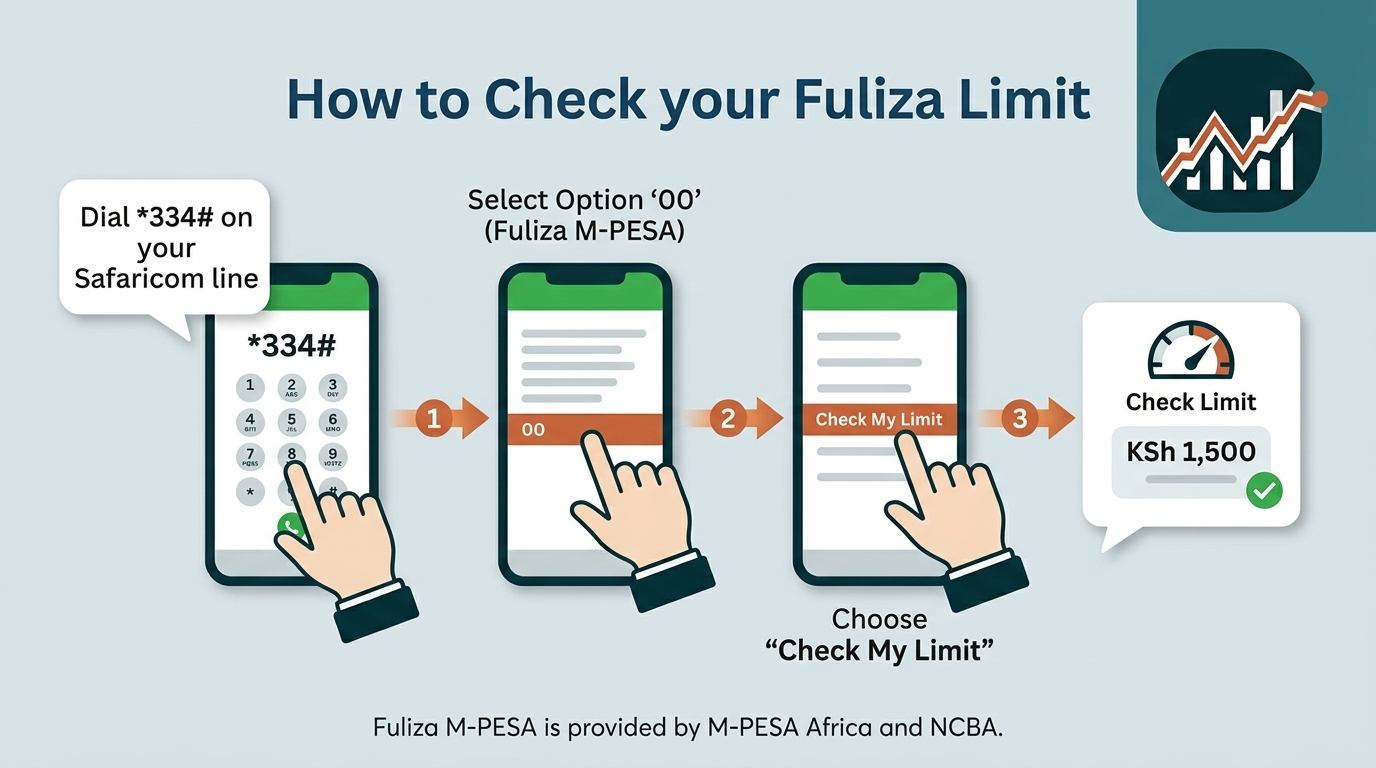
    To check your Fuliza limit, dial *334# on your Safaricom line, select option 00 (Fuliza M-PESA), then choose Check My Limit. Your total limit, remaining available amount and outstanding balance appear on screen within seconds and arrive separately as a confirmation SMS. The check is free, works on any handset including a basic feature phone, and requires no data bundle.

    One point of confusion is worth settling before you dial. A large share of published guides still direct readers to *234# for Fuliza. That was the historic M-PESA menu, and it continues to route many users to the overdraft options. However, Safaricom’s own customer support channel now consistently gives *334# as the path. Responding to a customer query in February 2026, Safaricom advised dialling *334#, selecting 00 for Fuliza, then Check My Limit. It repeated the same routing in June 2026 when advising a customer on refreshing a zero limit. Treat *334# as the current path and *234# as a legacy fallback.

    How Do You Check Your Fuliza Limit Using the M-PESA Menu?

    Dial *334#, select Fuliza M-PESA (option 00), then select Check My Limit — the full sequence takes under 30 seconds. The USSD route is the most reliable of the available methods because it does not depend on app version, operating system or internet connectivity.

    1. Dial *334# from the Safaricom line registered to your M-PESA account.
    2. Select Fuliza M-PESA. On the current menu this sits at option 00, at the foot of the main list.
    3. Select Check My Limit.
    4. Read the on-screen response, which shows your assigned limit and any outstanding balance.
    5. Wait for the confirmation SMS, which repeats the same figures in a message you can refer back to later.

    Two practical notes. The menu numbering can shift when Safaricom updates the USSD tree, so read the option labels rather than memorising the digits. And if *334# returns a busy or unavailable error during peak hours, waiting a few minutes and redialling usually resolves it, since the platform throttles briefly under load.

    How Can You Check Your Fuliza Limit on the M-PESA App?

    Open My OneApp, go to the Fuliza section, and your limit and outstanding balance display on the Fuliza dashboard. If you are looking for the standalone M-PESA app and cannot find it, that is expected — the app was consolidated in April 2026.

    Safaricom unveiled My OneApp on 2 April 2026 at its Decode 4.0 engineering summit in Nairobi, merging the M-PESA app and the MySafaricom app into a single platform. According to TechCabal, migration notices began reaching M-PESA app users from 3 April 2026, bringing more than 10 million users onto one interface. Your M-PESA wallet, PIN and transaction history carried across the migration; the name and interface are what changed.

    1. Open My OneApp and sign in with your Safaricom number, PIN or biometric login.
    2. Locate Fuliza. Because the app applies behavioural personalisation, Fuliza often surfaces directly on the home screen if you use it regularly; otherwise find it under the financial services or lending grouping.
    3. View your limit, amount used and outstanding balance on the Fuliza dashboard.

    The app advantage is history rather than the headline number. USSD gives you a snapshot; the app shows your usage over time, which matters if you are trying to understand why your limit moved.

    What Information Do You See When You Check Your Fuliza Limit?

    A Fuliza limit check returns four distinct figures: your total limit, your available limit, the amount you have used, and your outstanding balance. These are commonly treated as interchangeable, and they are not. Confusing the used amount with the outstanding balance is the single most frequent reason people are surprised by an auto-deduction.

    What Is Your Total Fuliza Limit?

    Your total Fuliza limit is the maximum overdraft Safaricom has assigned to your line, ranging from KSh 0 for ineligible or new customers up to a documented ceiling of KSh 70,000. It is a personalised figure, not a product-wide one.

    The limit is generated automatically by a credit-scoring process rather than requested by the customer. Safaricom’s published Fuliza terms state that the score considers a range of factors including a customer’s use of Safaricom services and their repayment history. Limits move in both directions: they are refreshed upwards or downwards depending on usage and timely repayment.

    What Is Your Available Fuliza Limit?

    Your available Fuliza limit is the amount you can still draw right now, calculated as your total limit minus everything you currently owe. This is the operative number when you are about to make a transaction.

    If your total limit is KSh 5,000 and you owe KSh 1,200, your available limit is KSh 3,800. It restores automatically as repayments clear, without any action on your part.

    What Is Your Used Fuliza Amount?

    Your used Fuliza amount is the principal you have actually drawn — the shortfall Fuliza covered on your transactions — excluding fees. If Fuliza covered a KSh 400 gap on one payment and a KSh 600 gap on another, your used amount is KSh 1,000.

    This figure is useful for reconciliation, but it is not what will be deducted from your next deposit. That is the outstanding balance.

    What Is Your Outstanding Fuliza Balance?

    Your outstanding Fuliza balance is the total repayable amount: the principal drawn, plus the one-off 1% access fee, plus every daily maintenance fee accrued to date and the excise duty on those fees. It is always equal to or larger than your used amount, and it grows each day the balance sits unpaid.

    The mechanics matter here. The 1% access fee is charged once, when you draw. The daily maintenance fee is then applied at midnight on any outstanding balance, and a 20% excise duty is charged on that maintenance fee. Because the fee is a flat band amount rather than a percentage, a small overdraft carried for a long period becomes expensive in proportional terms.

    How Do You Check How Much Fuliza You Have Left?

    Your remaining Fuliza is your total limit minus your outstanding balance, and the Check My Limit response on *334# shows both figures in the same message. You do not need to calculate it separately in most cases, because the response states the available amount directly.

    Where the calculation becomes necessary is when you have drawn recently and want to know your headroom before the next transaction. Subtract the outstanding balance — not the used amount — from the total limit. Using the outstanding figure accounts for accrued fees and gives you the number Safaricom’s system will actually apply.

    Bear in mind that any money entering your M-PESA wallet is applied to the Fuliza balance first. A deposit therefore increases your available Fuliza limit before it increases your usable wallet balance.

    Can You Check Your Fuliza Limit Without Using the M-PESA App?

    Yes — USSD requires no app, no smartphone and no internet connection, and remains the primary method Safaricom directs customers to. Confirming this in February 2026, Safaricom advised a customer using a basic handset that the limit can still be checked on a kabambe phone through the USSD menu.

    You have several app-free options:

    • USSD menu*334# > Fuliza M-PESA > Check My Limit. Works on every GSM handset.
    • Legacy USSD*234# > Fuliza M-PESA. Still routes on many lines; use it if *334# does not display the Fuliza option.
    • Confirmation SMS — every limit check and every Fuliza transaction generates a message. Your most recent one contains your limit and balance at that time.
    • Limit-change notifications — Safaricom sends an SMS when your limit is revised, stating the new figure.
    • Customer care — call 234 from your Safaricom line, or visit a Safaricom shop with your original ID.

    This accessibility is not incidental. USSD carries a substantial share of Kenya’s mobile money activity precisely because it works on the low-cost handsets that a large portion of M-PESA’s base still uses.

    Does It Cost Money to Check Your Fuliza Limit?

    No. Checking your Fuliza limit is free on both USSD and the app, and you can check as often as you like without charge. Safaricom’s service USSD codes are free to dial, and no airtime is deducted for the session.

    Two clarifications are worth stating plainly, because the distinction between checking and borrowing is where costs get misattributed:

    • Checking is free. Borrowing is not. Charges begin only when Fuliza covers a transaction shortfall — a one-off 1% access fee, then daily maintenance fees on the outstanding balance.
    • The app uses data; USSD does not. Opening My OneApp consumes a small amount of your bundle. The USSD session does not require data at all.

    Refreshing your limit is also free, and carries no penalty if the review returns the same figure.

    Why Can’t You See Your Fuliza Limit?

    The most common reason the Fuliza option does not appear is that the line has never been opted in to the service, since Fuliza is not enabled by default on M-PESA accounts. The menu entry is absent rather than showing a zero figure.

    The likely causes, in rough order of frequency:

    • You have not opted in. Activate through the same menu path — *334# > Fuliza M-PESA > Opt In — and accept the terms.
    • Your M-PESA account is registered on a foreign passport. Accounts registered with a foreign passport cannot successfully opt in to Fuliza. Registration with a national ID, Kenyan passport or military ID is required.
    • You are dialling from a different line. The check must come from the Safaricom number registered to the M-PESA account.
    • The session timed out. USSD sessions expire after a short idle period. Redial and move through the menu without pausing.
    • You are on the wrong menu branch. On some line configurations Fuliza sits under Loans and Savings rather than at option 00.

    Why Is Your Fuliza Limit Showing as Zero?

    A zero limit most often means you have been active on the Safaricom network for less than six months, which triggers an automatic zero allocation regardless of how well you use M-PESA. Safaricom states in its guidelines that customers on the network for under six months are assigned a zero limit.

    Opting in and qualifying are separate steps. Activation is straightforward; the credit assessment that follows is not guaranteed to return a usable figure. The main drivers of a zero or reduced limit:

    • Under six months on the network. An automatic zero until sufficient usage history accumulates.
    • Delayed or defaulted repayment. Safaricom has stated directly that a Fuliza limit may be reduced where a customer has delayed or defaulted on repayment.
    • Outstanding balances on related products. Safaricom has advised customers with zero limits to ensure outstanding loans are repaid on time, including Okoa Jahazi.
    • Scoring factors beyond transaction volume. High M-PESA turnover alone does not guarantee a limit. Responding to a customer who queried a persistent zero limit despite consistent usage, Safaricom described the scoring as an automated process weighing multiple metrics, and has not published the complete formula.

    If your limit is zero, you can trigger a review. Dial *334#, select option 00, then choose Refresh My Limit. Safaricom gave this instruction publicly in June 2026 to a customer reporting a zero limit. Set expectations accordingly: refreshing prompts a reassessment, and does not guarantee that a limit will be granted.

    One caution. Safaricom has publicly warned about fraudulent social media pages offering to raise Fuliza limits artificially, naming several fake accounts. No third party can adjust your limit. Any page or individual charging a fee to do so is running a scam.

    What Should You Do If You Cannot Access the Fuliza Menu?

    Work through the fixes in order of effort: retry the session, try the alternative USSD code, then escalate to customer care on 234. Most access failures are session or menu-path issues rather than account problems.

    1. Redial without pausing. Idle sessions expire. Move through the menu promptly.
    2. Try the legacy code. If *334# does not surface Fuliza, dial *234# and select Fuliza M-PESA.
    3. Check network registration. Confirm the line has signal and is registered on the network. Restart the handset if the code returns nothing at all.
    4. Retry after a few minutes. The platform throttles briefly during peak load, returning a service-unavailable error that clears on its own.
    5. Use My OneApp instead. If USSD is failing on your line specifically, the app reads from the same account data.
    6. Confirm your opt-in status. If Fuliza was never activated, or was deactivated, the menu will not display limit options. Our guide on how to opt out of Fuliza covers the opt-in and opt-out mechanics.
    7. Call 234 or visit a Safaricom shop. For account-level issues — suspected registration problems, or a limit that does not match your notifications — escalate with your original ID.

    How Can You Increase Your Fuliza Limit?

    Fuliza limits rise through consistent Safaricom and M-PESA usage combined with prompt repayment, and are refreshed automatically rather than granted on request. Safaricom’s guidance is that customers must continue using Safaricom and M-PESA services and repay the Fuliza facility on time by topping up their M-PESA account.

    The same logic applies in reverse — the limit is refreshed upwards or downwards depending on usage and repayment behaviour, so a period of late repayment can reduce a limit that was previously healthy. The mechanism also leaves little room for customer input: Safaricom has clarified that limits are automatically generated based on financial behaviour and are not manually requested, which means customers cannot request a reduction either.

    For the full method, including the repayment patterns that carry the most weight and the timelines involved, read our dedicated guide: How to Unlock Fuliza Limit: 6 Proven Ways. If your limit is low rather than zero, the mechanics of rebuilding it overlap heavily with general creditworthiness — our explainer on what a credit score is and how it works in Kenya covers the underlying scoring principles.

    How Do You Check Your Fuliza Balance Before Using Fuliza?

    Check your limit before you transact, not after, because Fuliza engages automatically at the point your wallet balance falls short — there is no separate borrowing step to reconsider. Once you accept the prompt at the end of a transaction, the access fee applies.

    A useful habit before any significant payment: dial *334#, confirm your wallet balance and your available Fuliza headroom, and only then transact. This tells you whether the payment will draw on Fuliza at all, and how much it will draw.

    Knowing the cost in advance is the other half of the decision. Fuliza charges a one-off access fee of 1% of the amount drawn, plus a flat daily maintenance fee determined by your outstanding balance band, with 20% excise duty applied to that daily fee. Balances of KSh 1,000 and below carry no daily maintenance fee for the first three days.

    Outstanding balance (KSh)Daily fee before excise (KSh)Daily fee incl. 20% excise (KSh)
    0 – 1000.000.00
    101 – 5002.503.00
    501 – 1,0005.006.00
    1,001 – 1,50018.0021.60
    1,501 – 2,50020.0024.00
    2,501 – 70,00025.0030.00
    Fuliza daily maintenance fee bands. Amounts of KSh 1,000 and below carry no daily fee for the first three days. The 1% access fee applies separately in all cases.

    This table resolves a discrepancy you will meet across other sources. Some publish the top daily fee as KSh 25, others as KSh 30; some give the KSh 101–500 band as KSh 2.50 and others as KSh 3. Both sets are correct — they are the same figures before and after the 20% excise duty. Safaricom publishes the fee before excise, and excise is added on top. Confirm your own band on *334#, since terms are assigned per customer.

    The practical implication is that duration, not size, drives the cost. A balance anywhere in the KSh 2,501–70,000 band accrues roughly KSh 30 daily including excise, which is around KSh 900 over a 30-day period whether the balance is KSh 3,000 or KSh 30,000. Fuliza was designed as a short-term facility — NCBA’s group managing director described the original intent as an overdraft for four to seven days. For anything longer, a fixed-fee product is generally the cheaper structure.

    Scale gives some context for how heavily the facility is used. According to figures reported from Safaricom’s FY2026 results, Fuliza disbursements rose approximately 49% year on year to around KSh 1.47 trillion, with repayments at a comparable KSh 1.49 trillion. Even so, penetration sits at roughly 17–18% of Safaricom’s active customer base, so the service is used intensively by a minority rather than relied on universally.

    Frequently Asked Questions About Checking Your Fuliza Limit

    What Is the USSD Code for Checking a Fuliza Limit?

    The current code is *334#, followed by option 00 for Fuliza M-PESA, then Check My Limit. The older *234# menu still reaches Fuliza on many lines and works as a fallback.

    What Is the Maximum Fuliza Limit?

    The documented maximum is KSh 70,000. Reaching it requires a sustained record of high M-PESA transaction volumes and consistent on-time repayment. Most customers hold limits well below this ceiling.

    How Often Is Your Fuliza Limit Reviewed?

    Limits are reviewed periodically and adjusted in either direction based on usage and repayment behaviour, and Safaricom has not published a fixed review interval. You can trigger an off-cycle review at any time using Refresh My Limit on *334#. Customers are notified by SMS when a limit changes.

    Can You Check a Fuliza Limit on a Basic Phone?

    Yes. USSD works on any GSM handset, and Safaricom has confirmed directly that the limit can be checked from a kabambe phone via the USSD menu. No internet, app or smartphone is required.

    Why Did Your Fuliza Limit Drop?

    A reduced limit usually follows delayed or missed repayment. Safaricom has stated that a Fuliza limit may be reduced where a customer has either delayed or defaulted on repayment. Reduced M-PESA activity can also contribute, since the scoring weighs ongoing usage alongside repayment history.

    Does Checking Your Fuliza Limit Affect Your Credit Score?

    No. Checking your limit is a read-only enquiry on your own account and does not constitute a credit application. What affects your standing is drawing on the facility and how promptly you repay it — Fuliza is provided with NCBA and KCB as the lenders, and repayment conduct feeds the scoring that determines future limits.

    Can Someone Else Check Your Fuliza Limit for You?

    No. The check must be performed from the registered Safaricom line, and the account holder must present original identification for any assisted enquiry at a Safaricom shop. Never share your M-PESA PIN. Safaricom does not request PINs by phone, SMS or USSD prompt, and any such request is fraudulent.

    Where Do the Figures in This Guide Come From?

    Menu paths and eligibility rules are drawn from Safaricom’s own customer communications and published Fuliza terms; tariff bands are drawn from Safaricom’s published fee structure as reported by Kenyan business press in mid-2026. Because interface paths and tariffs both change, verify your specific limit and fee band on *334# before relying on any figure for a financial decision.
  • What Is a Credit Score: How to Check your Credit Score

    What Is a Credit Score: How to Check your Credit Score

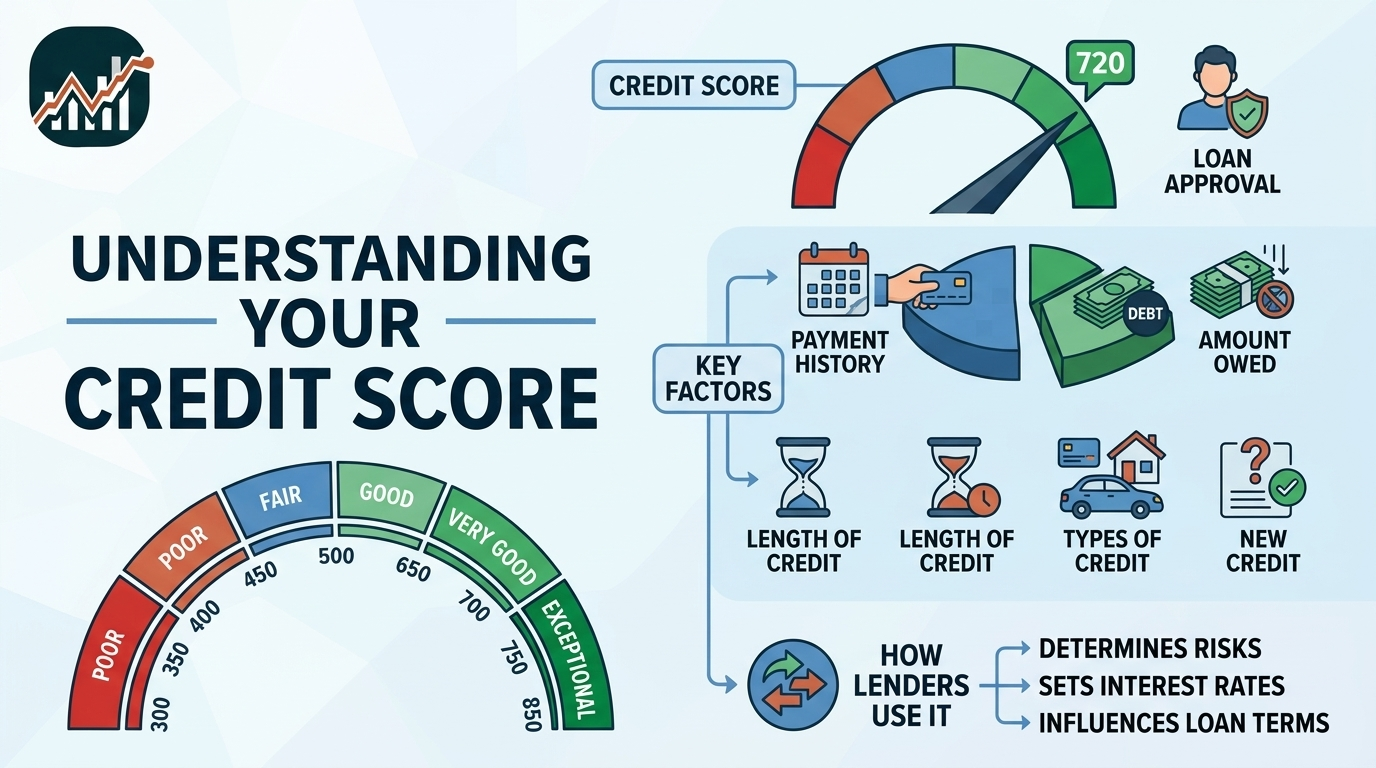
    A credit score is a three-digit number that converts a borrower’s credit history into a single measure of repayment risk. Lenders use it, alongside income and affordability checks, when deciding whether to approve a loan, credit card, or mortgage and on what terms.

    The number itself carries no meaning until you know which scoring model produced it. A score of 700 sits in the good band under FICO’s 300–850 scale, but the same figure means something different under Metropol’s 200–900 Metro-Score in Kenya. Reading a score correctly starts with identifying the model behind it.

    This guide explains what a credit score measures, how it is calculated, which behaviours move it, and how the ranges used by Kenya’s three licensed credit reference bureaus compare with the scoring systems you see quoted in international sources.

    What Is a Credit Score?

    A credit score is a numerical representation of credit risk, calculated from information held in a borrower’s credit file — including their record of repayments, outstanding balances, the age and type of their credit accounts, and their recent applications for new credit.

    A scoring model reads that file, weights the characteristics it finds, and returns a score inside a defined range. Because models differ in what they weight and which data they read, one person can hold several valid scores at the same time without any of them being wrong.

    A higher score signals a stronger credit profile. A lower score signals higher perceived risk. There is no universal cut-off separating a good score from a bad one, because that judgement belongs to the lender, the product, and the market.

    What Is the Difference Between a Credit Score and a Credit Report?

    A credit report is the detailed record of your borrowing and repayment history. A credit score is a number derived from that record. The report is the evidence; the score is the summary.

    FeatureCredit reportCredit score
    FormatDetailed document, several pagesSingle three-digit number
    ContentsAccounts, balances, repayment dates, defaults, enquiriesCalculated risk measure
    Produced byCredit reference bureauScoring model applied to the report
    Can it be disputed?Yes — inaccurate entries can be challengedOnly indirectly, by correcting the underlying report
    Kenya accessOne free report per year from each licensed bureauTypically KES 150–500 depending on bureau and product

    Correcting an error on the report is what moves the score. According to the Central Bank of Kenya, licensed bureaus operate under a dispute process that allows consumers to challenge entries they believe are inaccurate.

    Why Is a Credit Score Important?

    A credit score matters because it shapes the price and availability of credit. Two applicants asking for the same loan can receive different answers, different limits, and different interest rates on the strength of their scores alone.

    Depending on the lender and product, a score can influence approval, the amount advanced, the interest rate quoted, the credit limit assigned, the repayment period offered, and whether security is required.

    The score is one input, not the decision. Income, existing debt, employment, affordability, the purpose of the loan, and any collateral all feed into the same assessment. Kenyan credit information sharing rules require lenders to treat a credit score as one factor in pricing and assessing credit rather than as the sole basis for a decision.

    How Does a Credit Score Work?

    A credit score works by translating selected characteristics of your credit file into points, then totalling those points into a single figure on a fixed scale.

    The model does not read your file as a narrative. It reads it as variables: how many payments arrived on time, how much of your revolving limit is drawn, how old your oldest account is, how many enquiries appeared in the last twelve months. Each variable carries a weight, and the weights are set by the organisation that built the model.

    The score moves when the file moves. Clearing a balance, missing an instalment, opening an account, closing one, or applying for new credit all change the inputs, and the next calculation reflects them.

    How Is a Credit Score Calculated?

    A credit score is calculated by applying a proprietary scoring model to the data in your credit file, with each category of information weighted according to how strongly it predicts repayment.

    The exact formulas are commercial property and are not published. The category weights, however, are disclosed by some model owners. According to FICO, its widely used scoring model distributes weight as follows.

    Scoring categoryWeightWhat it measures
    Payment history35%Whether instalments arrived on time
    Amounts owed30%Balances relative to available credit
    Length of credit history15%Age of accounts and depth of record
    New credit10%Recent applications and newly opened accounts
    Credit mix10%Range of revolving and instalment accounts

    These weights apply to the FICO model and should not be assumed to hold for Kenyan bureau scores, which use their own methodologies. The direction of the factors is broadly consistent across models even where the percentages are not.

    Two scores belonging to the same person can differ because they were produced from different reports, on different dates, by different models. A gap between bureau scores is normal rather than evidence of an error.

    What Factors Affect a Credit Score?

    Five categories account for most of the movement in a credit score: payment history, credit utilisation, length of credit history, new credit enquiries, and credit mix.

    How Does Payment History Affect a Credit Score?

    Payment history is the heaviest single factor in most scoring models, carrying roughly 35% of the weight under FICO. It records whether each required payment arrived on time, arrived late, or did not arrive at all.

    Severity and recency both matter. A payment 90 days overdue damages a profile more than one settled a week late, and a default from last month weighs more than one from four years ago. In Kenya this category has widened considerably: digital credit providers report to the bureaus, so a defaulted mobile loan of a few hundred shillings can appear on the same record as a bank facility.

    How Does Credit Utilisation Affect a Credit Score?

    Credit utilisation is the share of your available revolving credit currently drawn, and it commonly carries the second-largest weight in a scoring model. A KES 30,000 balance against a KES 100,000 limit is 30% utilisation.

    Lower utilisation reads as lower dependence on borrowed funds. Guidance published by the major bureaus commonly points to keeping utilisation below roughly 30%, though the figure is a rule of thumb rather than a threshold hard-coded into any model. Paying a balance down before the statement date is what changes the reported figure.

    How Does the Length of Credit History Affect a Credit Score?

    Length of credit history measures how long your accounts have existed and how much evidence of your behaviour is available. A file spanning eight years supports a more confident prediction than one spanning eight months.

    This is the factor least responsive to effort, since it only accrues with time. Closing an old account that costs nothing to keep open shortens the average age of your accounts and removes the record it was contributing.

    How Do New Credit Enquiries Affect a Credit Score?

    A hard enquiry, recorded when a lender reviews your file for a new application, can reduce a score modestly and temporarily. A soft enquiry, such as checking your own report, does not.

    One enquiry rarely matters. A cluster of applications inside a few weeks does, because it suggests either urgent need for funds or repeated rejection. Checking your own credit report is a soft enquiry and is safe to do as often as you like.

    How Does Credit Mix Affect a Credit Score?

    Credit mix describes the variety of account types on your file — revolving credit such as cards and overdrafts, alongside instalment credit such as personal, asset, or mortgage loans.

    Managing both kinds well demonstrates a broader competence than managing one. This is the lightest of the five factors, and opening an account purely to diversify the mix is unlikely to repay the cost of doing so.

    What Is Considered a Good Credit Score?

    A good credit score is one that places a borrower in the lower-risk portion of the scale used by the lender assessing them. Under FICO’s 300–850 scale, that threshold begins at 670.

    FICO bandScore rangeInterpretation
    Exceptional800–850Very strong profile, widest access to credit
    Very good740–799Low risk, competitive terms likely
    Good670–739Acceptable risk to most lenders
    Fair580–669Approval possible, terms often stricter
    Poor300–579Limited access, higher pricing

    These bands describe one scoring system in one market. They are useful for interpreting American sources and comparing your position against them, but they do not translate directly to a Kenyan bureau score.

    What Is an Excellent Credit Score?

    An excellent score sits at the top of the scale — 800 to 850 under FICO, described by FICO as exceptional. It reflects a long record with few or no missed payments and low balances relative to limits.

    An excellent score improves access and pricing without guaranteeing either. A lender assessing affordability can still decline an applicant whose income does not support the repayment.

    What Is a Very Good Credit Score?

    A very good score falls between 740 and 799 on the FICO scale. Borrowers in this band are treated as low risk and typically reach the same products available to the top band, sometimes at marginally higher rates.

    What Is a Fair Credit Score?

    A fair score falls between 580 and 669 under FICO. The file usually contains positive history alongside something that raises risk — a past delinquency, high balances, or a short record.

    Credit remains available in this band, often with lower limits, shorter terms, higher rates, or a security requirement attached.

    What Is a Poor Credit Score?

    A poor score falls below 580 under FICO and signals elevated risk to a lender. It commonly follows missed payments, defaults, accounts in collection, sustained high utilisation, or a file too thin to assess.

    A poor score is a snapshot, not a sentence. Scores recalculate as the underlying file changes, and consistent on-time payments over subsequent months shift the profile.

    What Is a Good Credit Score in Kenya?

    In Kenya, a good credit score is one that falls in the lower-risk bands of the specific bureau’s scale — and each of the three licensed bureaus operates its own scale.

    Kenya has three credit reference bureaus licensed by the Central Bank of Kenya: TransUnion Kenya, Metropol CRB, and Creditinfo Kenya. All CBK-licensed lenders, including digital credit providers, report to at least one of them.

    BureauScore scaleConsumer access
    Metropol CRBMetro-Score, 200–900USSD *433#, Crystobol app, website
    TransUnion KenyaScale varies by productUSSD *212#, Nipashe app, website
    Creditinfo KenyaScale varies by productOnline consumer portal

    On Metropol’s 200–900 Metro-Score, consumer guidance commonly places scores from around 600 upward in the lower-risk portion of the scale, and scores near or below 400 in the high-risk portion where most applications are declined. Confirm the current banding with the bureau directly, since scales and cut-offs are revised.

    Because the scales differ, the productive question in Kenya is not whether your number beats an international average. It is which risk band your number occupies under the bureau your lender consults. According to FSD Kenya, a 2025 credit-risk tool standardises scores from all three licensed bureaus into comparable risk levels running from very low to very high risk — an acknowledgement that the raw numbers are not interchangeable.

    What Is the Average Credit Score?

    There is no single global average credit score, because averages are specific to a country, a bureau, and a scoring model.

    In the United States, where FICO Scores are widely used, the national average sits in the low 710s. According to FICO’s Credit Insights report, the average FICO Score stood at 714 in 2026, down around two points year on year; bureau snapshots from Experian place the same measure at roughly 713 to 715 depending on the sampling date. FICO attributed the decline largely to resumed student loan delinquency reporting and rising mortgage delinquencies.

    No equivalent headline average is published for Kenya. The bureaus do not release a single national figure, and with three separate scales it would carry limited meaning if they did. Kenyan borrowers get more from their own bureau report than from any national average.

    How Do You Check Your Credit Score in Kenya?

    You can check your credit score through any of the three licensed bureaus by USSD, mobile app, or website, using your national ID number to register. Kenyan law entitles every consumer to one free credit report each year from each bureau.

    1. Choose a bureau — Metropol, TransUnion Kenya, or Creditinfo Kenya.
    2. Register with your national ID number and phone number, then verify by SMS code.
    3. Request your free annual report, or pay for a score or additional report.
    4. Read the report for accounts you do not recognise, balances already settled, or listings recorded against the wrong person.
    5. Repeat with the other two bureaus, since lenders do not all report to the same one.

    Fees vary by bureau and product. Additional reports and standalone scores commonly fall in the KES 150 to KES 500 range, while a certificate of clearance is priced considerably higher — frequently quoted at around KES 2,200. Confirm current pricing with the bureau before paying.

    Spacing your three free reports across the year gives you coverage of all three files at no cost.

    How Long Does Negative Information Stay on a Credit Report in Kenya?

    Adverse credit information in Kenya is commonly reported as remaining on file for five years from the date of default. Settling the debt updates the status of the listing rather than deleting it.

    After payment, the lender is required to update the entry from non-performing to settled within the applicable reporting timetable. A settled listing reads differently to a lender than an outstanding one, which is why clearing an old default has value even when it does not disappear from the report.

    Accurate negative information cannot be removed on request. Inaccurate information can be disputed through the bureau’s correction process, and this is the only route by which a valid listing leaves a file early. Retention rules are revised periodically, so verify the current position with the Central Bank of Kenya or the bureau.

    How Can You Improve Your Credit Score?

    A credit score improves when the underlying file improves — through on-time payments, lower balances, corrected errors, and time. No service can accelerate this by editing accurate data.

    • Pay on schedule, every cycle. This is the heaviest factor in most models, and the effect compounds across months of consistent repayment.
    • Bring utilisation down. Reducing a drawn balance before the statement date lowers the figure the bureau receives.
    • Clear outstanding defaults. A settled listing signals resolution, even though the entry remains for the retention period.
    • Audit all three bureau reports. Errors are correctable, and a wrongly recorded default is the fastest available gain.
    • Space out applications. Clustered enquiries read as distress; spreading them avoids that signal.
    • Keep older accounts open. Closing a long-held account shortens your history and removes the record it supports.

    Progress is measured in months, not days. A file with recent defaults responds more slowly than one with a single missed payment, and any offer of instant score repair for a fee deserves scepticism.

    Credit Score Questions Answered

    Does Checking Your Own Credit Score Lower It?

    No. Checking your own credit score is a soft enquiry and does not affect the score. Only hard enquiries, recorded when a lender assesses a new application, carry a scoring impact.

    Can You Get a Loan With a Poor Credit Score in Kenya?

    Yes, though the options narrow and the pricing rises. Some lenders and government-backed products weight bureau listings differently from mainstream banks, and certain microfinance providers lend to borrowers with adverse history at higher rates. Read the total repayment cost, not the headline rate, before accepting.

    How Often Does a Credit Score Update?

    A score recalculates whenever the underlying file is updated, which for most borrowers means monthly. Lenders submit data on their own reporting cycles, so a payment made today may take several weeks to appear.

    Why Do Your Scores Differ Between Bureaus?

    Scores differ because each bureau holds a different set of data and applies a different model to it. A lender reporting to one bureau and not the others produces a genuine gap between your files. Checking all three is the only way to see the full picture a lender might.

    Does Fuliza or a Mobile Loan Affect Your Credit Score?

    Yes. CBK-licensed digital credit providers report to the credit reference bureaus, so mobile lending appears on your credit file alongside bank borrowing. Small defaulted balances can be listed, which is why an unpaid mobile loan can surface during an application for a much larger facility.

    This article is general information about how credit scoring works. It is not financial advice, and specific eligibility, pricing, and bureau rules should be confirmed with the lender or bureau concerned.

  • How to Opt Out of Fuliza

    How to Opt Out of Fuliza

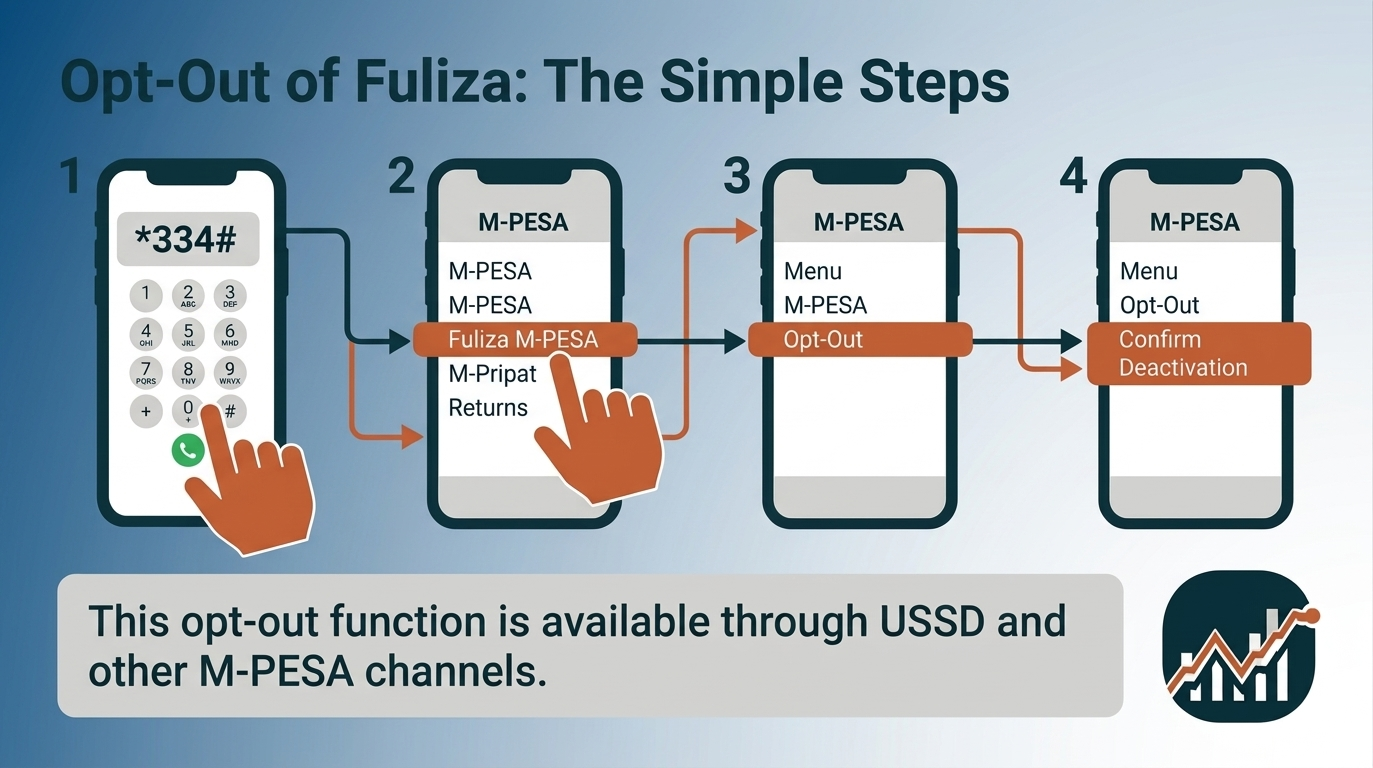
    To opt out of Fuliza, dial *334# from your Safaricom line, select Fuliza M-PESA, and choose the opt-out option. Follow the prompts on your screen to confirm that you want to deactivate Fuliza. Safaricom identifies an opt-out function as a menu option available through USSD and its M-PESA/Safaricom channels.

    Fuliza is an overdraft service from Safaricom that completes an M-PESA transaction when your balance is insufficient. Safaricom describes it as a continuous overdraft rather than a loan product: it activates automatically on a shortfall, and repayment is taken automatically from any funds later received or deposited into your M-PESA account, along with a daily maintenance fee on the outstanding amount.

    Opting out switches off your access to that overdraft. It is a separate action from repaying what you have already borrowed, and the two are frequently confused.

    This guide covers the opt-out process, what changes afterwards, what to do when the opt-out fails, how to reactivate, and how opting out differs from repayment.

    Menu paths and service terms change. Confirm the current process against Safaricom’s own Fuliza information or customer care before relying on any specific step below.

    How do you opt out of Fuliza?

    You opt out of Fuliza by dialing *334# on the Safaricom line registered for M-PESA, selecting Fuliza M-PESA, choosing the opt-out option, and confirming when prompted. Safaricom’s published Fuliza information lists the opt-out alongside your limit, balance and mini statement in that same menu.

    Using USSD:

    1. Dial *334# on the registered Safaricom line.
    2. Select Fuliza M-PESA.
    3. From the options shown — limit, balance, mini statement, opt out — select the opt-out option.
    4. Confirm when prompted.
    5. Wait for the confirmation SMS from Safaricom.

    Safaricom customer care has also directed customers to *234# for the Fuliza menu. If one code does not display the option on your line, try the other.

    Using the M-PESA app:

    1. Open the M-PESA app and locate Fuliza in your services or account section.
    2. Open the Fuliza service page.
    3. Select the opt-out option — on some app versions it sits behind the menu icon in the corner.
    4. Confirm your choice and wait for the confirmation message.

    What you need before starting:

    • The Safaricom line registered to the M-PESA account, with network access
    • Your M-PESA PIN
    • Your current Fuliza balance, which the same menu displays

    Treat the request as incomplete until the confirmation message arrives. A USSD session that times out mid-way changes nothing on your account.

    Can you opt out of Fuliza if you still have an outstanding balance?

    Yes. However, opting out of Fuliza does not cancel or erase an outstanding Fuliza balance. An existing Fuliza balance remains a repayment obligation even after you stop or deactivate access to future Fuliza borrowing.

    Opting out affects your future access to Fuliza, not money you have already borrowed. If you have an outstanding Fuliza balance, you still need to repay the amount according to the applicable repayment terms. Once you opt out, you should therefore think of two separate actions: stopping future Fuliza use and clearing your existing Fuliza balance.

    Does opting out cancel Fuliza debt? No. Deactivating or opting out of Fuliza should not be treated as a way to avoid repayment. Your outstanding balance is separate from your ability to access additional Fuliza funds.

    Repayment continues to work the way it always has. Any funds received or deposited into your M-PESA account are applied automatically to the outstanding Fuliza amount, and the daily maintenance fee continues to accrue on that amount until it is cleared. You can check the balance from the Fuliza menu at any time.

    If your main reason for opting out is to stop borrowing while you repay what you already owe, you can opt out and continue focusing on clearing the outstanding balance. If you’re considering opting out because of the cost of borrowing, it may also help to compare Fuliza’s fees, borrowing limit and repayment terms with other digital loan options before deciding.

    What happens after you opt out of Fuliza?

    After you opt out of Fuliza, the overdraft stops covering your shortfalls. Transactions that exceed your available M-PESA balance are declined instead of being completed on credit. Everything else about your M-PESA account continues to work as before.

    What changesWhat stays the same
    Fuliza no longer covers shortfalls on your transactionsYour M-PESA account works normally
    You stop taking on new Fuliza borrowingYour line, number and M-PESA PIN are unaffected
    Transactions above your available balance are declinedOther M-PESA products you use are unaffected
    You no longer have overdraft accessAny outstanding Fuliza balance remains repayable

    The practical effect is that your spending is limited to the money actually in your wallet. A payment you could previously push through on the overdraft will now fail for insufficient funds. For most people who opt out, that is the intended outcome rather than a side effect.

    Daily maintenance fees stop accruing only once the outstanding balance itself is cleared, since the fee is charged against the balance rather than against having the service switched on.

    Does opting out of Fuliza cancel your existing debt?

    No. Opting out of Fuliza does not cancel, reduce or write off an existing Fuliza balance. Opting out changes your access to future borrowing; it has no effect on money already advanced to you.

    A Fuliza balance is an amount you owe irrespective of whether the service is active on your line. Deactivating access does not stop the daily maintenance fee accruing on that balance, and it does not release you from the repayment terms you accepted when you opted in.

    Recovery also continues after opting out. Money received or deposited into your M-PESA account is still applied automatically to the outstanding Fuliza amount until it reaches zero.

    If your goal is to stop the automatic deductions, opting out alone will not achieve it. The deductions stop when the balance is cleared, not when access is switched off.

    Can you still use M-PESA after opting out of Fuliza?

    Yes. You can use M-PESA normally after opting out of Fuliza. Fuliza is a service layered on top of M-PESA, not a requirement for holding or using an M-PESA account, and opting out does not deregister your line or restrict any standard M-PESA function.

    After opting out you can still:

    • Send and receive money
    • Deposit and withdraw at an M-PESA agent
    • Pay through Lipa Na M-PESA — Buy Goods and Paybill
    • Buy airtime and data bundles
    • Request statements, change your PIN and manage your account

    The single difference is the source of funds. Every transaction is now settled from your available balance only. Fuliza governs whether a shortfall gets covered; it does not govern M-PESA itself.

    If a transaction fails after you opt out, check your balance before assuming a fault. An insufficient-funds decline is the expected behavior of an account without overdraft access.

    Why would you want to opt out of Fuliza?

    People opt out of Fuliza to stop unplanned borrowing, to stop automatic deductions from incoming funds, and to avoid daily maintenance fees. The common thread is a decision to limit spending to available balance rather than to an overdraft.

    Specific reasons include:

    • Ending the automatic deduction cycle. Because repayment is taken from incoming funds, money you receive can be absorbed before you can use it. Opting out stops new borrowing that would feed that cycle.
    • Preventing unintended borrowing. Fuliza activates automatically on a shortfall rather than on request, so a transaction can become a borrowing event without a deliberate decision.
    • Avoiding daily maintenance fees, which accrue against an outstanding balance for as long as it remains unpaid.
    • Enforcing a spending limit, since declined transactions provide a hard ceiling that willpower alone does not.
    • Breaking a repeat-borrowing pattern, where each shortfall is covered by the overdraft and the next deposit repays it, leaving the same shortfall to recur.

    None of this makes Fuliza unsuitable in itself. It is a facility with a defined cost. Opting out is a judgment that the cost has stopped being worth it in your circumstances.

    Can you temporarily stop using Fuliza without opting out?

    There is no temporary pause option in the Fuliza menu. You can, however, leave the service active and avoid triggering it by keeping your M-PESA balance above the value of each transaction, since Fuliza only activates when funds are insufficient.

    Access can also lapse without any action on your part. Safaricom’s terms state that you lose access to your Fuliza limit if a balance remains unpaid after 30 days, and that access is restored on full repayment. That is a consequence of non-payment rather than a method for pausing the service, but it shows that availability is not permanent.

    The trade-off between the two approaches is straightforward:

    • Leaving it active keeps a safety net available, and keeps it available on days when you would rather it were not.
    • Opting out removes the option entirely and requires a deliberate opt-in to reverse.

    If your goal is a firm stop, opt out. If you want the facility in reserve for a genuine emergency, leave it active and manage your balance.

    Can you reduce your Fuliza limit instead of opting out?

    Your Fuliza limit is set by Safaricom rather than chosen by you, so reducing it is not a self-service option in the way opting out is. Safaricom reviews each limit every 90 days based on how you use M-PESA and how you repay.

    That leaves three practical choices:

    OptionWhat it doesSuits
    Opt outEnds access to the overdraft entirelyA clean stop
    Keep it, don’t use itLeaves the service active; you avoid triggering itHolding a reserve you rarely want
    Reduce usageLower activity can produce a lower limit at the next reviewWinding down gradually

    Because limits move with usage, the same mechanism works in reverse: a limit can fall on its own if the service goes unused between reviews. If you specifically need a lower limit rather than none at all, ask Safaricom customer care what is available on your account.

    How do you check whether you have successfully opted out of Fuliza?

    You confirm a Fuliza opt-out three ways: the confirmation SMS from Safaricom, the contents of the Fuliza menu on *334#, and the behavior of a transaction that exceeds your available balance.

    1. The confirmation message. A completed opt-out generates an SMS from Safaricom. Keep it as your record of the date.
    2. The Fuliza menu. Dial *334# and open Fuliza M-PESA. An account with access switched off generally presents an opt-in option rather than the usual limit and balance display.
    3. A live transaction. Attempt a payment slightly above your available balance. If it is declined for insufficient funds rather than completed, the overdraft is no longer active.

    Note that an outstanding balance can still appear in the menu after a successful opt-out. That is expected: the balance is separate from access, and it remains visible until repaid.

    If the service still shows as active some time after the confirmation message, contact Safaricom rather than repeating the opt-out.

    What should you do if you cannot opt out of Fuliza?

    If the Fuliza opt-out does not complete, the cause is usually the channel rather than the account: a timed-out USSD session, a menu that has moved between app versions, or the request being made from a line other than the registered one.

    Work through these in order:

    • The request does not go through. USSD sessions expire and drop in weak coverage. Retry where the signal is stronger.
    • The option is not displayed. Try the alternate USSD code, or switch between USSD and the M-PESA app.
    • Wrong line. The opt-out works only from the Safaricom line registered to that M-PESA account.
    • App version. Update the app; the position of the Fuliza options changes between releases.
    • Outstanding balance. If the menu returns an error while a balance is outstanding, ask Safaricom whether the balance is affecting the request on your account.
    • Still active after confirmation. Allow processing time, then verify again using the three checks above.

    If none of this resolves it, the issue is specific to your account and only Safaricom can inspect it. Contact customer care rather than repeating failed attempts.

    Can you activate Fuliza again after opting out?

    Yes. Opting out of Fuliza is reversible. You reactivate by dialing *334#, selecting Fuliza M-PESA, choosing to opt in, and accepting the terms — the same path Safaricom publishes for first-time activation.

    Two conditions apply when you return:

    • Eligibility is assessed again. Access depends on holding an active Safaricom line registered for M-PESA, and on your M-PESA usage and repayment history at that time.
    • Your previous limit is not guaranteed. Limits are reviewed periodically against usage, so a gap in activity can produce a different figure on return.

    Does opting out of Fuliza increase your limit?

    No. Opting out of Fuliza does not increase your Fuliza limit. Opting out ends your access to the overdraft, and the limit attached to that access is set by Safaricom against your M-PESA usage and repayment history rather than reset by deactivation.

    Safaricom reviews Fuliza limits periodically — every 90 days — against how actively you use M-PESA and how consistently you repay. A period spent opted out generates neither usage nor repayment history, so it gives that review nothing to raise a limit on.

    Does opting out and opting back in reset your limit upward? No. Reactivation reassesses your eligibility rather than granting a fresh or higher figure, and your previous limit is not guaranteed on return. A gap in activity is as likely to produce the same limit, or a lower one.

    Limits do move, but in the opposite direction from the one this assumption expects. Safaricom’s terms suspend access to your limit if a balance goes unpaid beyond 30 days, and restore it on full repayment.

    So if a higher Fuliza limit is what you want, opting out works against it: consistent M-PESA activity and on-time repayment are what the review responds to, which is the subject of our guide on how to increase fuliza limit. If your goal is to stop borrowing rather than to borrow more, opting out is the right action — but treat it as ending access, not as resetting a number.

    Does opting out of Fuliza affect your credit or eligibility?

    Opting out of Fuliza is a voluntary service change, not a default, and should not be treated as equivalent to missing a repayment. What it can affect is your Fuliza limit, because limits are built on M-PESA usage and repayment history that pauses while you are opted out.

    The distinction that matters:

    • Opting out ends your access to the facility by choice. The obligation to repay any existing balance continues unchanged.
    • Failing to repay is a separate matter. Unpaid mobile credit can affect your standing with lenders, and Safaricom’s own terms suspend access to the limit after 30 days unpaid.

    So the risk to your record comes from an unpaid balance, not from the act of opting out. Someone who clears their balance and then opts out is in a different position from someone who opts out while a balance runs on.

    For anything concerning your formal credit record, the authoritative sources are your lender and the credit reference bureaus.

    What are the alternatives to using Fuliza?

    The alternatives to Fuliza fall into two groups: removing the shortfall that triggers borrowing, and choosing a different facility when borrowing is genuinely necessary. Opting out addresses access to Fuliza but not the underlying cash-flow gap.

    • Transact within your available balance. The default position once you opt out, and the one that costs nothing.
    • Hold a small buffer in M-PESA so routine payments do not fall short in the first place.
    • Save ahead for known recurring costs — rent, school fees, insurance, subscriptions — so predictable expenses stop presenting as emergencies.
    • Keep a separate emergency reserve for genuinely unexpected costs, held apart from day-to-day spending money.
    • Compare formal credit on total cost if borrowing is unavoidable, weighing fees, interest and repayment terms rather than speed of access.

    A shortfall that recurs every month is a budgeting problem rather than a borrowing problem, and closing the facility does not by itself resolve it.

    What is the difference between opting out of Fuliza and repaying Fuliza?

    Opting out of Fuliza ends your access to future borrowing. Repaying Fuliza clears money you have already borrowed. They are independent actions: you can do either without the other, and doing one does not accomplish the other.

    Opting outRepaying
    What it affectsFuture accessMoney already borrowed
    Effect on an outstanding balanceNoneReduces or clears it
    Effect on daily maintenance feesNone while a balance remainsStops them once cleared
    How it happensDeliberately, through the menuAutomatically, from incoming funds

    The practical consequence is that stopping the deductions requires repayment, while stopping the borrowing requires opting out. Someone who wants both needs to do both.

    Where can you get help with Fuliza?

    Safaricom is the only party that can resolve account-specific Fuliza issues — a disputed balance, an opt-out that will not complete, or a question about your limit. General guidance cannot see your account.

    You can reach Safaricom through the customer care line, the MySafaricom app, an official Safaricom retail shop, or Safaricom’s verified social media support channels.

    Have the following ready:

    • The registered phone number
    • Your ID details for verification
    • The date and amount of any transaction in question
    • Any confirmation or error message you received

    Safaricom will never ask for your M-PESA PIN. Any request for your PIN, through any channel, is an attempted fraud and should be refused and reported.

  • How to Rebuild Your Emergency Fund After an Unexpected Expense

    How to Rebuild Your Emergency Fund After an Unexpected Expense

    Using your emergency fund for a major unexpected expense can be stressful, especially when it takes a large portion—or all—of your savings. But this is exactly what an emergency fund is designed for: giving you access to cash when an urgent expense cannot reasonably be covered by your regular income.

    The next step is to rebuild the financial cushion you used.

    Rebuilding does not necessarily mean replacing the money as quickly as possible. A better approach is to determine how much you actually need, assess your current cash flow, set a realistic savings target, and create a contribution plan you can maintain.

    1. Find Out How Much You Need to Rebuild

    Start by comparing your emergency fund before and after the unexpected expense.

    For example, suppose you had $8,000 in emergency savings and used $2,500 to pay for an unexpected car repair. You now have $5,500 remaining.

    If your original $8,000 target still makes sense, your immediate rebuilding gap is:

    $8,000 − $5,500 = $2,500

    But don’t automatically assume that the amount you spent is the amount you need to replace. The emergency may reveal that your original savings target was either too high or too low for your current circumstances.

    Consider:

    • How much you have left in emergency savings
    • Your essential monthly expenses
    • Your household size
    • The stability of your income
    • Your existing debt payments
    • Whether another large expense is likely
    • How easily you could access additional money if another emergency occurred

    Your objective is to restore an adequate financial cushion, not simply return to an arbitrary number.

    2. Recalculate Your Emergency-Fund Target

    Your emergency-fund target should reflect the financial risks you actually face.

    Someone with highly stable income and few financial obligations may have different needs from someone whose income varies significantly or who supports several dependents.

    Start with your essential monthly expenses. These can include costs such as:

    • Housing
    • Utilities
    • Food
    • Transportation
    • Insurance
    • Minimum debt payments
    • Necessary healthcare
    • Other expenses you would need to continue paying during a financial disruption

    Then consider how long you would want your emergency savings to cover those essential costs.

    For example, if your essential expenses are $3,000 per month, a target of three months of essential expenses would be:

    $3,000 × 3 = $9,000

    That becomes a reference point for your rebuilding goal.

    The right target depends on your circumstances. The important thing is that your target has a reason behind it.

    3. Calculate Your Emergency-Fund Gap

    Once you’ve established your target, calculate the difference between that target and your current emergency savings.

    Emergency-fund gap = Target emergency fund − Current emergency savings

    For example:

    • Target: $9,000
    • Current emergency savings: $5,500
    • Amount to rebuild: $3,500

    You now have a specific savings objective instead of a vague goal to "save more."

    This distinction matters because a defined funding gap makes it possible to determine how much you need to save and how long rebuilding will take.

    4. Choose a Realistic Rebuilding Timeline

    Next, decide how quickly you want to close the gap.

    Suppose you need to rebuild $3,500 and want to do it over seven months:

    $3,500 ÷ 7 = $500 per month

    You would need to contribute approximately $500 each month.

    You can also break the target into smaller contributions:

    • Approximately $115 per week
    • Approximately $250 every two weeks
    • $500 per month

    The best schedule is the one that fits your actual cash flow and pay cycle.

    A shorter rebuilding period requires larger contributions. A longer period reduces the required contribution but leaves you with a smaller financial cushion for longer.

    5. Look at Your Cash Flow Before Cutting Your Budget

    Don’t create a savings target based on an amount you cannot realistically afford.

    Review your monthly cash flow:

    Income − essential expenses − debt obligations − other necessary spending = available cash flow

    Then determine how much of that remaining cash can consistently go toward rebuilding your emergency fund.

    You may find that your current budget only allows $200 per month, even though your ideal target requires $500.

    That’s useful information.

    Instead of abandoning the goal, you can consider:

    • Extending the rebuilding period
    • Temporarily reducing discretionary spending
    • Increasing income
    • Redirecting money from completed financial goals
    • Using occasional windfalls to make larger contributions

    The objective is to create a sustainable contribution, rather than an aggressive savings target that causes you to abandon the plan after one or two months.

    6. Automate Your Emergency-Fund Contributions

    Once you’ve decided how much you can save, make the contribution automatic whenever possible.

    An automatic transfer can move money from your checking account into your emergency savings shortly after you receive your paycheck. This reduces the need to remember to make the transfer manually and makes rebuilding part of your regular financial routine.

    For example, if your rebuilding target is $400 per month, you could:

    • Transfer $200 after each biweekly paycheck
    • Transfer about $100 each week
    • Transfer $400 once a month

    Choose a schedule that matches when you receive income.

    The important attribute is consistency. A smaller contribution that you can maintain is generally more useful than a larger contribution that repeatedly causes you to run short of cash.

    Track your progress

    Your emergency-fund balance should gradually move toward your target:

    Current balance → regular contributions → increasing reserve → target balance

    You can track three numbers:

    1. Current emergency savings
    2. Target emergency savings
    3. Remaining amount to rebuild

    For example:

    Target: $9,000
    Current balance: $5,500
    Remaining gap: $3,500

    After contributing $400, the remaining gap falls to $3,100.

    Seeing the gap decline can make a long-term savings goal easier to manage.

    7. Temporarily Reduce Nonessential Spending

    If you want to rebuild your emergency fund faster, look for expenses that can be reduced without compromising essential needs.

    You don’t necessarily need to make permanent lifestyle changes. A temporary reduction in discretionary spending can accelerate the recovery of your savings.

    Potential areas to review include:

    • Restaurant and takeout spending
    • Entertainment
    • Unused subscriptions
    • Nonessential shopping
    • Recreational travel
    • Other discretionary purchases

    The key is to distinguish between essential expenses and discretionary expenses.

    You don’t want to cut necessary spending so aggressively that you create another financial problem. Instead, consider temporary adjustments that free up cash for your rebuilding goal.

    8. Use Extra Income to Rebuild Faster

    Additional income can shorten the time required to restore your emergency savings without permanently reducing your normal budget.

    Depending on your circumstances, this could include:

    • Overtime
    • Freelance work
    • A temporary side job
    • Selling items you no longer need
    • Bonuses
    • Tax refunds
    • Other one-time income

    You can decide in advance how much of an unexpected income source will go toward your emergency fund.

    For example, you might choose to direct 50% of a bonus toward rebuilding your savings while using the remainder for another financial priority.

    This creates a useful distinction between your normal savings contribution and accelerated rebuilding contributions.

    9. Decide Whether to Rebuild Your Emergency Fund or Pay Down Debt First

    An unexpected expense can leave you facing two competing priorities: rebuilding your savings and paying down debt.

    There isn’t one answer that applies to everyone.

    Consider both your liquidity needs and the cost of your debt.

    If your emergency fund has been completely depleted, rebuilding at least a basic cash reserve can reduce the risk that your next unexpected expense forces you to borrow again.

    On the other hand, high-interest debt can become increasingly expensive if it remains outstanding for a long period.

    Your decision should take into account:

    • Current emergency-fund balance
    • Debt interest rates
    • Minimum debt payments
    • Income stability
    • Essential monthly expenses
    • Likelihood of another major expense
    • Access to other sources of emergency cash

    In some situations, the most practical approach is to do both: maintain a basic emergency reserve while directing additional money toward expensive debt.

    10. What If You Used Your Entire Emergency Fund?

    If an unexpected expense reduced your emergency savings to $0, don’t assume you need to immediately rebuild the entire fund.

    Start by establishing a small accessible cash reserve.

    For example, your progression might look like:

    $0 → starter reserve → one month of essential expenses → larger emergency fund

    The first objective is to create some financial breathing room. Once you have established that initial reserve, you can continue working toward your larger target.

    If another necessary expense occurs before your emergency fund has been rebuilt, you may face a short-term cash shortfall. Before borrowing, consider whether the expense can be delayed, whether another source of cash is available, or whether payment terms can be negotiated. If borrowing becomes necessary, compare the costs, fees, and repayment terms of available emergency loans.

    11. Keep Your Emergency Fund Somewhere Accessible

    The purpose of emergency savings is not to generate the highest possible investment return. It is to provide liquid cash when you need it.

    For many people, an appropriate place for emergency savings is an account that provides:

    • Easy access to the money
    • Low risk of losing principal
    • Reasonable interest
    • Separation from everyday spending

    A savings account can help keep your emergency reserve separate from your checking account while still allowing you to access the money when a genuine emergency occurs.

    Before choosing an account, check its fees, withdrawal rules, interest rate, accessibility and applicable deposit protections.

    12. Separate Emergency Savings From Sinking Funds

    One reason people repeatedly drain their emergency fund is that they use it for expenses they could have anticipated.

    This is where a sinking fund can complement an emergency fund.

    An emergency fund is generally intended for unexpected and urgent financial needs.

    A sinking fund is designed for known or predictable expenses that occur irregularly.

    For example:

    Expense Appropriate savings purpose
    Unexpected car breakdown Emergency fund
    Planned annual insurance bill Sinking fund
    Sudden medical expense Emergency fund
    Planned home maintenance Sinking fund
    Unexpected job loss Emergency fund
    Annual school expense you know is coming Sinking fund

    Separating these purposes can reduce the number of times you need to draw down your emergency reserve.

    13. Rebuild More Than You Spent If Your Circumstances Have Changed

    The unexpected expense may reveal that your previous emergency-fund target was no longer sufficient.

    For example, perhaps your essential expenses have increased since you originally built your emergency savings.

    You may now have:

    • Higher housing costs
    • Additional dependents
    • Greater debt obligations
    • Higher insurance costs
    • Less stable income
    • New recurring expenses

    In that case, simply replacing the amount you withdrew may leave you underprepared.

    Instead, reassess the target.

    Your goal should be:

    Appropriate emergency-fund target − current emergency savings = new rebuilding requirement

    This turns the unexpected expense into an opportunity to update your financial plan.

    14. Protect Your Rebuilt Emergency Fund

    Once you restore your savings, establish clear rules for when you will use it.

    A genuine emergency generally involves an unexpected, necessary expense or significant financial disruption that cannot reasonably be handled through your normal cash flow.

    Before withdrawing money, ask:

    1. Is the expense unexpected?
    2. Is it necessary?
    3. Is it urgent?
    4. Can I reasonably pay for it from my normal income?
    5. Do I have another dedicated fund for this expense?

    If the expense is predictable and can be planned for, a sinking fund or regular budget may be more appropriate.

    This doesn’t mean you should avoid using your emergency fund. The purpose of the fund is to be used when you genuinely need it.

    The goal is simply to preserve it for situations that actually require emergency cash.

    15. Create a Plan for the Next Unexpected Expense

    Rebuilding your emergency fund is only part of becoming financially resilient.

    After you’ve restored the reserve, look at what caused the previous financial disruption.

    If you used your savings for a car repair, for example, consider whether regular vehicle maintenance savings could reduce the financial impact of future repairs.

    If the expense was medical, review your insurance coverage and healthcare-related savings.

    If the problem involved a temporary loss of income, consider whether your emergency fund target adequately reflects the stability of your income.

    The question is not only:

    How do I rebuild the money I used?

    It is also:

    How can I make my finances better prepared for the next unexpected expense?

    16. A Simple Emergency-Fund Rebuilding Plan

    You can turn the entire process into eight steps:

    Step 1: Calculate what you have left.
    Determine your current emergency-fund balance.

    Step 2: Calculate what you need.
    Set a target based on your essential expenses and financial circumstances.

    Step 3: Calculate the gap.
    Subtract your current balance from your target.

    Step 4: Choose a timeline.
    Decide how quickly you want to rebuild the difference.

    Step 5: Set your contribution.
    Divide the rebuilding gap by your target number of months.

    Step 6: Automate the contribution.
    Schedule transfers around your paycheck.

    Step 7: Accelerate when possible.
    Use temporary spending reductions or additional income to make extra contributions.

    Step 8: Review the target.
    Once you’ve rebuilt the fund, reassess whether the amount still reflects your financial situation.

    17. The Bottom Line

    Using your emergency fund for an unexpected expense doesn’t mean you’ve failed at saving. The fund served its purpose by giving you access to money when you needed it.

    The important next step is to restore that financial cushion.

    Start by calculating your current balance, target balance and rebuilding gap. Then create a contribution amount that fits your cash flow and choose a realistic timeline.

    If your circumstances have changed, don’t simply replace what you spent. Recalculate how much emergency savings you actually need.

    And once your fund is rebuilt, consider using sinking funds, budgeting and other financial-planning tools to reduce the chance that predictable expenses will drain it again.

    The goal isn’t simply to have a certain amount of money sitting in savings. The goal is to maintain enough liquid financial reserves to absorb an unexpected expense without forcing you into expensive debt or disrupting your essential finances.

  • How to Unlock M-Shwari Loan Limit: Fact Checked!

    How to Unlock M-Shwari Loan Limit: Fact Checked!

    M-Shwari evaluates your loan limit using multiple credit risk indicators rather than a single eligibility requirement. Each indicator measures a different aspect of your financial behavior, from repayment reliability and savings discipline to transaction activity and cash flow stability. Together, these factor form your lending profile and influence how your loan limit changes over time.

    1. Improve your loan repayment history to strengthen your credit profile

    Loan repayment history contributes approximately 35% to your M-Shwari loan limit assessment. It is the strongest indicator of credit risk because it measures whether you repay borrowed funds on or before the due date. Every on-time repayment strengthens your repayment profile, while late payments, missed payments, or loan defaults reduce lender confidence. Consistently clearing each loan before the repayment deadline demonstrates responsible borrowing behavior and significantly improves your chances of qualifying for a higher loan limit during future credit reviews.

    2. Increase your M-Shwari savings to demonstrate financial discipline

    Regular savings contribute approximately 20% to your overall lending profile. M-Shwari evaluates how consistently you save rather than the size of a single deposit. Frequent deposits into your savings account indicate financial discipline, stable money management, and the ability to build reserves. Maintaining an active savings habit over several months provides positive evidence that you can manage both savings and debt responsibly, increasing the likelihood of receiving a higher borrowing limit.

    3. Boost your M-PESA transaction activity to demonstrate stable cash flow

    M-PESA transaction activity accounts for approximately 15% of your credit assessment. Frequent deposits, money transfers, bill payments, merchant payments, and airtime purchases help establish a consistent cash flow pattern. Higher transaction frequency and value provide stronger evidence that your account is actively used and regularly funded. Low account activity or long periods without transactions reduce the amount of behavioral data available for credit evaluation, making it more difficult to justify a higher loan limit.

    4. Maintain responsible loan utilization to show genuine borrowing needs

    Loan utilization contributes approximately 10% to M-Shwari’s lending assessment. The system evaluates whether you use your approved loan limit responsibly and repay it consistently. Borrowing within your available limit and repaying the balance in full demonstrates sustainable credit usage. Frequently borrowing the maximum amount without timely repayment or leaving loans outstanding for extended periods may indicate elevated repayment risk and reduce future limit growth.

    5. Strengthen your income and cash flow patterns to improve repayment capacity

    Income consistency contributes approximately 10% to your borrowing profile. Regular deposits into your M-PESA wallet indicate predictable cash flow and improve the lender’s confidence in your repayment ability. Stable income patterns, whether from salary payments, business receipts, or recurring transfers, provide stronger evidence of repayment capacity than irregular or infrequent deposits. Consistent cash inflows support both loan approval and future limit increases.

    6. Maintain an active account to build long-term trust

    Account tenure contributes approximately 5% to the overall assessment. Older M-PESA and M-Shwari accounts with consistent activity provide more historical data for evaluating borrowing behavior. While account age alone does not increase your loan limit, maintaining continuous account activity without long periods of inactivity strengthens your credit profile and supports future lending decisions.

    7. Build a positive overall credit record to increase lender confidence

    Overall credit behavior contributes approximately 5% to your lending profile. Responsible management of digital credit products demonstrates long-term financial reliability. Maintaining a clean repayment record across your borrowing history strengthens lender confidence and supports higher loan limits over time. Repeated defaults, unpaid balances, or persistent repayment problems weaken your overall credit profile and may reduce both eligibility and borrowing capacity.

    This weighting emphasizes behavior over demographics. Approximately 90% of a customer’s loan limit growth depends on measurable financial behaviors—repaying loans on time, saving consistently, maintaining active M-PESA transactions, and demonstrating stable cash flow—while only 10% depends on relatively static characteristics such as account age and overall historical credit standing. This makes M-Shwari a predominantly behavior-driven digital lending product.

  • How to Unlock Fuliza Limit: 6 Proven ways

    How to Unlock Fuliza Limit: 6 Proven ways

    Your Fuliza limit is determined by your overall M-PESA usage and repayment behavior—not by a single transaction or request. Safaricom automatically reviews eligible accounts using behavioral data collected over time, including how consistently you repay Fuliza, how actively you use M-PESA, the frequency and value of your transactions, wallet funding patterns, and the age of your Safaricom line. These factors collectively help the system estimate your repayment capacity and determine whether your current limit should remain the same, increase, decrease, or stay at zero. The weighted factors below represent the key behaviors that have the greatest influence on Fuliza limit growth, with repayment history and M-PESA activity carrying the highest importance.

    1. Improve your repayment consistency to qualify for limit reviews.

    Fuliza’s system prioritizes repayment history, assigning 30% weight to how fast and frequently you repay borrowed amounts. Delays beyond 24 hours reduce your trust score, while instant top-ups after each Fuliza transaction raise it. Fulfilling repayment within 1–3 days consistently signals low risk and can trigger limit adjustments during Safaricom’s periodic reviews, which happen every 90 days. Regular repayments reset your internal score and may unlock suspended limits if you previously defaulted.

    2. Boost your M-PESA transactions to signal consistent financial activity.

    Safaricom uses your M-PESA usage volume as a 25% scoring signal when reviewing Fuliza limits. Performing at least 5–10 transactions per week—such as sending money, paying bills, or buying airtime—demonstrates that you are active and have regular cash flow. Reduced M-PESA activity over 30+ days is interpreted as financial dormancy, weakening your profile. Sustained high-volume M-PESA activity boosts both transaction count and transactional value scores, which directly impact your eligibility for upward Fuliza reviews.

    3. Build repayment trust by topping up your wallet immediately after Fuliza use.

    Wallet top-ups are critical for Fuliza settlement, carrying 15% weight in the scoring system. If you top up your account within minutes or hours after Fuliza activates, the system reads this as high repayment intent. For example, if you use KSh 1,000 via Fuliza and deposit KSh 1,000 the same day, your repayment velocity improves, increasing your behavioral repayment score. In contrast, if you delay deposits for several days, this weakens repayment predictability and delays access to new limits.

    4. Strengthen your Fuliza score by avoiding partial repayments and delays.

    Your loan-to-usage ratio contributes 10% to your growth score, and system logic favors users who utilize most of their current limit and repay in full. If you’re given a KSh 1,500 limit but only use KSh 300 intermittently, the system flags underutilization. Similarly, paying back KSh 200 out of KSh 1,000 creates a repayment gap and slows score progression. Using ≥80% of your available limit and repaying 100% consistently sends a strong usage and credit capacity signal, qualifying you for periodic limit increases.

    5. Grow your limit by using Fuliza frequently and repaying reliably.

    The frequency of Fuliza usage accounts for 10% of limit growth. If you only use Fuliza once or twice a month, your demand signal remains weak, even with good repayment. However, borrowing within your limit range 2–3 times weekly, followed by prompt repayment, shows financial need, system dependency, and credit discipline. Repeated cycles of borrow-repay increase your utilization index, which enhances your limit growth score.

    6. Unlock higher limits by keeping your SIM active and transacting regularly.

    SIM tenure, though only 10% weighted, is a prerequisite. You must have an active Safaricom line for at least 6 months to receive a Fuliza limit. However, keeping the line active with consistent call, data, and SMS usage ensures your Fuliza account remains in good standing. Dormancy of your line for more than 30 days may trigger a limit freeze or reset. Regular usage of your line supports your profile continuity and helps maintain upward eligibility for Fuliza loan scoring cycles.